
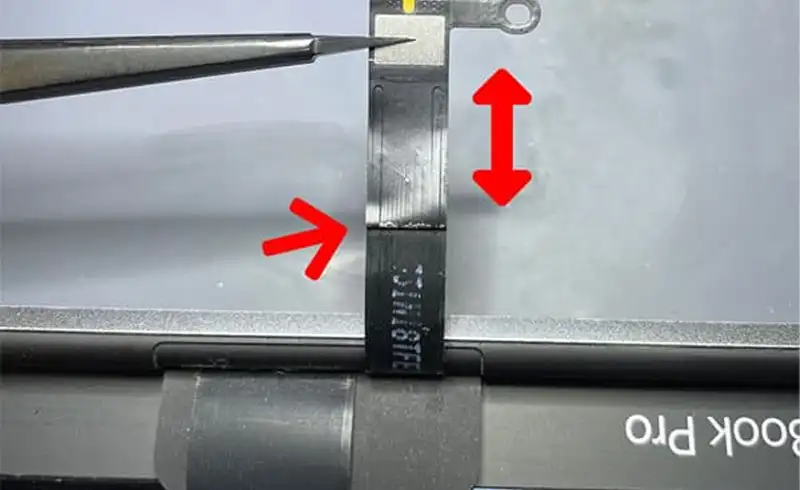
What Flexgate is and why it happens
A MacBook Pro\'s display connects to the logic board through two thin flex cables: one for the backlight and one for the video signal. On the 2016-2018 models, these cables are anchored directly in the hinge area, and the length Apple chose proved too short.
Every time you open the lid, the cables stretch over an edge and bend at the exact same point, at the base of the hinge. After 1,000-2,000 cycles — just a few years of normal use — the copper fibers inside the cable crack and break gradually. It\'s not a matter of luck or misuse: on affected models, the defect is practically inevitable if you don\'t intervene. The repair publication iFixit documented the phenomenon in 2018, named it „Flexgate", and dubbed the visual effect „stage light" — because the band of light at the bottom of the screen looks like stage spotlights.
Keep in mind: Flexgate is strictly a cable problem, not an LCD panel or a logic board one. That\'s why, in most cases, the correct repair means replacing the cables — not the whole display, as sometimes happens out of ignorance or commercial interest.
The 3 phases — how it evolves over time
Flexgate doesn\'t appear suddenly — it worsens predictably, in three phases. Yours tells you how urgent the intervention is:
Light band at the bottom of the screen („stage light")
Screen goes dark at a wide angle
Fully black screen
The flashlight test — the at-home check: when the screen looks „black", shine your phone\'s flashlight on its surface from an angle. If you can faintly see the desktop under the light, the panel and video cable are fine — only the backlight has failed (fixed via the backlight cable). If you see absolutely nothing even with the flashlight, the video data cable is probably affected too. It\'s the simplest way to gauge how advanced Flexgate is before you reach the shop.
Which models are affected
Check your model in the Apple menu (top-left corner) → About This Mac. Here\'s the full picture, with model numbers (A-numbers):
| Year | Model | A-number | Status | Note |
|---|---|---|---|---|
| 2016 | MacBook Pro 13" (Touch Bar + Function) | A1706 · A1708 | Affected | Highest-risk model. The only one covered by Apple's program (now expired). |
| 2016 | MacBook Pro 15" | A1707 | Affected | High risk, but never covered by Apple's program. |
| 2017 | MacBook Pro 13" | A1706 · A1708 | Affected | Same construction as 2016, same defect. |
| 2017 | MacBook Pro 15" | A1707 | Affected | High risk, not covered by the program. |
| 2018 | MacBook Pro 13"/15" | A1989 · A1990 | Reduced risk | Apple quietly lengthened the cable by ~2mm — „solving it without admitting the problem". Some units still fail. |
| 2019 and newer | MacBook Pro (all) | — | Fixed | Redesigned cable. Flexgate no longer appears on these models. |
Apple\'s program — why it no longer helps you today
In May 2019, under public pressure, Apple launched the „13-inch MacBook Pro Display Backlight Service Program", which repaired the defect for free. Sounds good, but it had big limits: it covered ONLY the 2016 13" MacBook Pro (the 2- and 4-Thunderbolt-port variants), sold between October 2016 and February 2018. The 15" models, and those from 2017 and 2018, were never included, though they suffered from the exact same defect. Coverage was 5 years from purchase or 3 years from the program\'s launch — deadlines that have already passed. Today the program is fully expired, so any Flexgate repair is on your own, and a specialized independent shop is the most rational option.
The two cables involved
The repair revolves around two flex cables. What symptoms each causes and when it gets replaced:
| Cable code | Role | Typical symptom | When it\'s replaced |
|---|---|---|---|
| 821-01228-A | Backlight cable | Light band, screen dark at wide angle | Almost always — it's the first to fail |
| 821-01229-A | Video data cable (image signal) | Fully black screen, no image even with a flashlight | Recommended together with the backlight cable, to avoid a second repair |
How it\'s properly repaired — the in-shop process
Flexgate is a precision repair: the cables are cheap, but reaching them takes experience. Here\'s exactly how we do it:
Diagnosis and confirmation
We test at what angle the display fails and do the flashlight test to establish whether only the backlight cable is affected or the video data cable too. We confirm the logic board and LCD panel are functional — Flexgate is strictly a cable problem, not a board one.
Opening the display assembly
The delicate part. To reach the cables, the LCD panel must be carefully released from the frame with metered heat and dedicated tools. This is where amateur repairs most often go wrong — a rushed release cracks the panel, turning a cable repair into a full display one.
Replacing the flex cables
We fit quality new cables. We recommend replacing both cables (backlight + video) in the same repair, even if only one is showing symptoms — the other has the same wear and is very likely to fail a few months later.
Testing at all angles + reassembly
We verify operation at every opening angle before gluing the panel back. We reassemble with fresh adhesive and do a full final test. We only hand the laptop back once the display works flawlessly from 0 to 180 degrees.
Cables vs full assembly — which option is right
This is the difference between a shop that helps you and one that profits. There are two approaches, and the right choice depends strictly on the state of your panel:
Flex cables only
Full display assembly
Our honest stance: for a clean Flexgate (intact panel, only failed cables), replacing the cables is the correct and far more economical choice. We\'ll propose a full display ONLY if the panel is also faulty (cracked, spots, dead pixels). If a shop asks you upfront to replace the whole display for a simple light band, it\'s worth a second opinion.
Repair or replace the whole MacBook?
The question is all the more relevant because these exact Intel models (2016-2018) just lost support for macOS 27. Effectively, you have a laptop with a repairable defect but also a closing software horizon. Our rule: if the laptop is otherwise healthy and you use it for everyday tasks, a Flexgate repair of a few hundred lei gives it years more useful life — clearly worth it. If it has other major problems and you were already using it for heavy work with sensitive data, it might be time for a transition. We detailed the whole decision logic in the guide on Intel MacBooks losing macOS 27 and whether they\'re still safe to use.
Frequently asked questions
I have a light band at the bottom of my screen. Is it definitely Flexgate?
Why does Flexgate happen, exactly?
The flashlight test — how do I do it and what does it tell me?
Wasn't there a free Apple program for this?
How much does the repair cost and how long does it take?
Is it worth repairing a 2016-2018 MacBook Pro with Flexgate, or replacing it?
What do I do so it doesn't get worse before I reach the shop?
Can it happen again after the repair?
Related resources from our site
We\'ve written articles that complete the topic of display repairs and MacBook defects:
- MacBook LCD panel replacement with IC transfer — when the panel really must be replaced, how we preserve True Tone
- MacBook without macOS 27 support — is it safe? — the exact Intel models affected by Flexgate
- MacBook „burned CPU" — myth vs reality — when the logic board is to blame and when it isn\'t
- Apple hardware defects timeline — Flexgate in the context of the other „gates"
- 12-month MacBook repair warranty — what we cover and why