
Part 1 — Why you replace just the panel, not the whole assembly
On MacBook, the „display" consists of two distinct components:
- The LCD/OLED panel — the actual glass with digitizer, optical layer and, on Pro models, mini-LED matrix. This is the part that breaks when the phone falls on the display or when you close the lid over an object.
- The top assembly (housing) — aluminum lid, hinges, iSight/FaceTime HD camera, WiFi/Bluetooth antennas, internal flex cables. All these remain intact in 90% of simple broken glass cases.
When you pay „complete assembly" at a shop, you also pay for parts you don\'t need to replace. The difference is significant — typically 40-50% extra cost. At Radical Service, if at diagnostic we find that aluminum is intact and hinges functional, we propose panel-only LCD/OLED replacement with IC transfer — at appreciably lower cost and with the same aesthetic + functional result.
Part 2 — Technical comparison: panel only vs full assembly
| Aspect | Panel only LCD/OLED | Full assembly |
|---|---|---|
| What gets replaced | Just the LCD/OLED panel (glass + digitizer + optical layer) | Complete assembly: panel + aluminum lid + hinges + iSight camera + WiFi antennas |
| When it applies | Glass is cracked but the aluminum back of the lid is straight (no bends, no deformation) | MacBook dropped from height, lid is bent, hinges affected or camera no longer works |
| Relative cost | Approximately 40-50% cheaper — you pay only for the panel, not for metal that's intact | Higher cost — includes parts you don't need to replace |
| Execution time | 3-5 hours under microscope — adhesive release, panel separation, new panel mount, recalibration | 1-2 hours — disconnect cables, replace complete assembly, testing |
| True Tone / calibration | Preserved via IC transfer (we move the original identification chip onto the new panel) | Requires IC transfer if assembly panel is generic — otherwise True Tone disappears |
| Difficulty level | High — requires microscope, hot air station, dedicated spudger, OCA adhesive | Moderate — more mechanical than microsoldering |
Part 3 — Our IC transfer procedure in 7 steps
We don\'t give you just a commercial list. We explain what we do, step by step, because we want you to understand why it takes 4-6 hours and why it\'s worth more than „quick assembly swap":
- 1
Visual diagnostic + lid aluminum check
10-15 minutesWe verify whether the back of the lid (aluminum) has bending marks, internal cracks or affected hinges. Panel-level repair is only recommended if the aluminum structure is sound. Otherwise, invisible outer deformation of the lid makes flat panel mounting impossible — we go with full assembly.
- 2
Remove old panel from housing
60-90 minutesWith hot air station set to controlled temperature (60-80°C), we uniformly warm the lid edge to deactivate original adhesive. We use plastic spudger + cutting wire for progressive separation. Procedure takes time because any rush means scratches on aluminum or tearing of the anti-reflective layer.
- 3
Extract IC (identification chip) from old panel
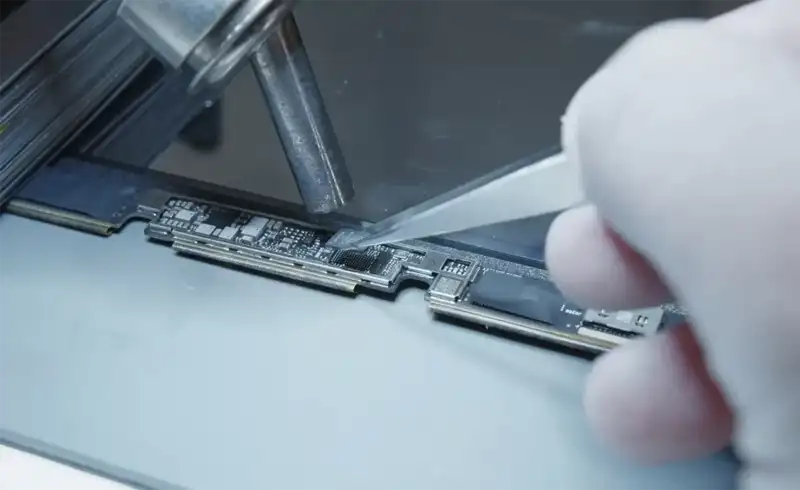
20-30 minutesEvery MacBook panel (starting with 2016) has a small chip — EDID / T-Con — containing unique color calibration data: True Tone profile, max brightness per pixel, white point calibrated by Apple in factory. We desolder it under microscope with hot air, prep it for transfer.
- 4
Clean + prepare new panel
15-20 minutesThe new panel (OEM / Original Replacement) arrives with a generic IC chip, without your calibration. We desolder and discard it. We clean the area with 99% isopropanol and prepare the pads for transferring your original chip.
- 5
Transfer IC onto new panel + continuity check
30-45 minutesWe solder your original chip onto the new panel using stereo microscope at 40x. We check with Fluke multimeter each of the 20-30 pins for correct continuity. A single cold solder pin = True Tone not working or dead pixel lines.
- 6
Reassembly + fresh OCA adhesive + cleaning
30-45 minutesWe apply fresh OCA (Optically Clear Adhesive) between panel and aluminum housing. We press under calibrated weight for 15-20 minutes. We clean edges of excess adhesive. All under controlled UV lamp for correct adhesive polymerization.
- 7
Complete functional test
20-30 minutesWe power on MacBook. We verify: True Tone active in Settings → Displays (no „third-party" warning appears), constant brightness corner to corner with colorimeter instrument, colors calibrated with Apple Diagnostics, iSight camera functional, WiFi at normal signal (antenna is in lid). Handover only after complete testing.
Part 4 — Supported MacBook models
We perform the procedure on all MacBook Air and Pro models starting with 2016 (when Apple introduced the identification IC on the panel). Updated situation:
| Model + A-number | Panel only | Assembly | Technical notes |
|---|---|---|---|
| MacBook Air 13" M1 (2020) — A2337 | Yes | Recommended for bent lids | Most frequent request. LCD Retina panel 2560×1600. |
| MacBook Air 13" M2 (2022) — A2681 | Yes | Recommended for bent lids | Liquid Retina panel 2560×1664, IC transfer mandatory for True Tone. |
| MacBook Air 13" M3 (2024) — A3113 | Yes | Recommended for bent lids | Constructively identical to M2, same procedures. |
| MacBook Air 15" M2/M3 — A2941/A3114 | Yes | Recommended for bent lids | Larger panel (2880×1864), execution time ~30 min longer. |
| MacBook Pro 14" M1 Pro/Max — A2442 | Yes (mini-LED) | Recommended for mini-LED dead zones | Most economical Pro panel. IC transfer mandatory for XDR HDR. |
| MacBook Pro 14" M2 Pro/Max — A2779 | Yes (mini-LED) | Recommended for mini-LED dead zones | Constructively identical to M1 Pro. |
| MacBook Pro 14" M3 Pro/Max — A2918/A2992 | Yes (mini-LED) | Recommended for mini-LED dead zones | Redesigned chassis — careful hinge check needed. |
| MacBook Pro 14" M4 Pro/Max — A3112/A3401 | Yes (mini-LED) | Recommended for mini-LED dead zones | Panel with ProMotion 120Hz + True Tone. IC transfer critical. |
| MacBook Pro 16" M1 → M4 Pro/Max | Yes (mini-LED) | Recommended for mini-LED dead zones | Panel 3456×2234. IC transfer + zone dimming calibration. |
| MacBook Pro 13" Intel/M1 Retina — A1706 → A2338 | Yes | Recommended for bent lids | Mature models, optimized procedure. OEM parts in stock. |
Part 5 — When we do NOT recommend panel-only (honesty)
There are situations where changing just the panel doesn\'t make technical sense. If at diagnostic we find one of the following, we tell you directly that full assembly is needed — we don\'t push the commercially more profitable procedure that wouldn\'t hold:
Aluminum lid has visible bends
A deformed lid does NOT allow flat panel mounting — air bubbles under adhesive appear in 100% of cases, and True Tone doesn't calibrate correctly due to uneven pressure.
Hinges have lateral play or you hear clicks
Hinges are part of the complete assembly. If they have play, the panel will bend when opening/closing the lid — repair guaranteed to fail.
iSight / FaceTime HD camera no longer works
Camera + microphones are integrated in the top assembly. If they don't work, you're replacing complete assembly anyway — no point doing just the panel.
WiFi antenna is broken (very weak signal)
WiFi and Bluetooth antennas are cabled inside the lid. A broken cable requires complete assembly — panel alone doesn't solve.
MacBook came in contact with liquid on the top part
Liquid infiltrated through display edge corrodes both panel and camera and antennas. Complete assembly is the only solution with real warranty.
Part 6 — Warranty you get
12-month warranty written on RO e-Factura fiscal invoice — part + labor covered. You return with the invoice if any defect appears in the interval, we resolve without arguments. No handwritten receipt, no verbal promise — you have a legally valid document recognized by consumer protection or court without exception.
What warranty covers: newly-appeared dead pixels, vertical/horizontal lines, ProMotion no longer working (Pro models), True Tone disappearing from Settings, inconsistent brightness, mini-LED dead zones (Pro M1+), uneven backlight. What it does NOT cover: subsequent fall, liquid contact, physical pressure (object forgotten on keyboard when closing lid) — external causes not related to our labor quality.
Part 7 — Why Radical Service (11 years experience, publicly verifiable)
Radical Service — the same team has been repairing Apple since 2014, from the workshop on Strada Aristotel Pappia 40, Sector 1, Bucharest, since 2019 (the Radical name dates from 2020). VAT-paying company active on ANAF registry (publicly verifiable — search our CUI on anaf.ro). Invoices reported in RO e-Factura for every intervention. Google reviews with multi-year verifiable history, with real photos from clients over the years — not profile created last week.
For MacBook LCD panel replacements, the procedure is optimized through thousands of MacBook repairs since 2014. We don\'t experiment on your device — we know exactly what works per model, what tricks are needed for IC transfer under microscope, how long OCA adhesive needs to polymerize for each panel. Difference vs a service created last month: consistency + reproducibility.