
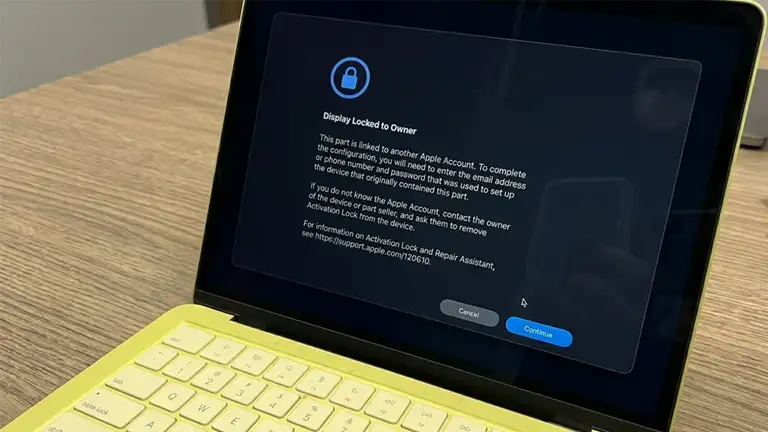
What the message says, broken down
The screen with the blue padlock looks technical and intimidating, but the message is actually simple. Here\'s exactly what it says and what each line means:
The title says it all: the display fitted in the laptop is locked to someone else's Apple Account. Not yours, not the shop's — the account of the person the part physically came from.
The technical confirmation: the part (here, the display) was once part of another Mac, and that Mac had Find My active with a linked Apple Account. The part „remembers" where it came from.
This is the key. To work fully, the part must be unlocked by the ORIGINAL owner of the device it was taken from. If that device was stolen or lost, it's practically impossible — nobody unlocks a device they no longer have.
The technical term: it\'s called Parts Activation Lock — Activation Lock extended down to the part level. Apple documents it officially on support page 120610. It started on iPhone (models 12 and newer) and now covers Macs too, for the expensive parts: display, battery, front camera, Touch ID sensor.
Why this message is actually good news
The first reaction is to see it as a problem. But if you\'re a legitimate user — or an honest shop — it\'s the opposite. Here\'s why:
It reduces the incentive to steal Apple devices
Until now, a stolen MacBook was worth money „for parts" — display, battery, camera were sold separately and ended up in other laptops. With Parts Activation Lock, parts from a stolen device become flagged and restricted in any other Mac. A thief can no longer „strip and sell clean" — the parts value drops sharply, and with it the reason to steal.
It protects the second-hand buyer
If you buy a used MacBook or pay for a repair, the „Display Locked to Owner" message is an instant alarm: the part comes from a locked device, most likely stolen. Without this feature, you'd be left with a laptop full of „dirty" parts without knowing. Now the system warns you by itself.
It separates honest shops from the rest
This is the most important effect for the Romanian market. There are shops — many in Bucharest — that fit cheap parts recovered from stolen laptops. The result is exactly the screen in the photo: „Display Locked to Owner". A proper shop fits OEM or Original parts, legally sourced, correctly recognized by the Mac, with no warning at all. This message is effectively a test that separates the two categories.
It aligns Mac with what already happens on iPhone
Parts Activation Lock started on iPhone (models 12 and newer) and has now extended to Mac — battery, display, camera, Touch ID sensor. It's the same anti-theft principle, carried across all Apple devices. We covered the full mechanism in the article on the iOS 27 lock systems.
What to do if you see this message after a repair
If you had your MacBook repaired somewhere and, at startup or during setup, „Display Locked to Owner" appears, it means a locked part was fitted. Here are the concrete steps:
Don't accept the laptop „as is"
If you left your MacBook at a shop and it comes back with „Display Locked to Owner", the fitted part comes from a locked device. Don't accept explanations like „it's normal, it comes that way" or „it disappears after an update". It isn't normal and it won't disappear — it's a part that isn't cleanly yours.
Demand a correct, recognized part
You're entitled to a part that configures correctly — either OEM or Original — and that triggers no warning. A serious shop swaps it without argument. If they refuse or stall, it's the clear signal they work with parts of dubious origin.
Check in Parts & Service
Open the Apple menu → About This Mac → More Info → the Parts & Service section. A correct part shows no warnings. A locked or unpaired part permanently displays a „Finish Repair" label — a sign the repair isn't „clean". It's the evidence you can show anyone.
If you bought the laptop like this — mind the consequences
A MacBook with a locked part isn't covered by Apple's warranty or AppleCare for that part, can't be traded in, and may lack some features (especially security ones). Its value and usefulness drop. If the seller can't unlock the part (because it isn't theirs), you most likely have a device with illegally-sourced components.
The consequences of a locked part
According to Apple\'s official documentation (support page 120610), a part left locked brings a concrete list of downsides:
| Aspect | What happens |
|---|---|
| Apple warranty / AppleCare | A locked part is NOT covered for service until it's unlocked by the original owner. |
| Trade-in | You can't trade in the device while the part is locked. |
| Functionality | The part may work, but uncalibrated — it might not work properly or may lack critical privacy, security, or safety features. |
| „Finish Repair" label | In Parts & Service, the part permanently shows „Finish Repair" — a visible, permanent sign the repair is incomplete. |
| Unlocking | Apple CANNOT unlock a used part. Only the original owner of the source device can release it via Find My. If the device was stolen, it's practically impossible. |
From the field — on newer models it\'s even worse: Apple\'s documentation says, in general terms, that a locked part „can be used" with limited features. In reality, on recent generations things are harsher. A client sent us a photo of a MacBook Neo with exactly this screen — the laptop doesn\'t even get past the „Display Locked to Owner" message. It doesn\'t say somewhere that the part isn\'t original, there\'s no simple label you can ignore: it simply won\'t boot past the padlock screen. The display, even if it\'s original and in perfect condition, is completely unusable because it comes from a locked device. The client had ended up at a shop that most likely didn\'t even know exactly what it was selling.
How to check for yourself, in 30 seconds
You don\'t need to be a technician to check whether your repair is clean. Open the Apple menu (top-left corner) → About This Mac → More Info → scroll to the Parts & Service section (or Parts and Service History). A correct, legally-sourced part shows no warning. A locked or unpaired part permanently displays the „Finish Repair" label. Do this check right after any display, battery or camera repair — it\'s the simplest proof that the shop did the job correctly.
How we fit parts — correctly, whether OEM or Original
Our stance is simple: a part must be clean, correctly recognized by the Mac, and warning-free. It matters less whether it\'s OEM Premium or Original Apple — what matters is that it doesn\'t come from a stolen device. Here\'s how we work:
Legally-sourced parts
We don't work with parts recovered from stolen or locked devices. Our sources are official GPD suppliers (European parts distributors) and Service Pack / Original parts, with documentation. A legal part doesn't trigger „Display Locked to Owner", because it doesn't come from a stranger's Apple Account.
OEM or Original — but correctly recognized
It matters less whether the part is OEM Premium or Original Apple — what matters is that the Mac recognizes it correctly and gives you no warnings. We tell you clearly what we fit and where it comes from. You can choose OEM vs Original informed, but both must be clean.
Correct pairing / configuration when needed
For parts that need configuration (calibration via Repair Assistant), we do it correctly, so True Tone, auto-brightness and the other features work fully. A clean repair means zero „Finish Repair" labels left behind.
Transparency in Parts & Service
After the repair, you can check for yourself in About This Mac → Parts & Service. If we fit a part, we want it to show up clean, with no warnings. That's the proof of our work, and we encourage you to check it.
The honesty test: any serious shop should let you — even encourage you — to check in Parts & Service after the repair. If a shop avoids this check or tells you the warning „is normal", it\'s the clear signal they work with parts you don\'t want in your laptop. With us, the check is welcome anytime.
The bigger picture — Apple\'s control, used for good
We often criticize Apple\'s control over devices — from which apps you can install to the iOS 27 lock systems. Parts Activation Lock, though, is a case where the same control clearly works in the honest user\'s favor: it discourages theft, protects buyers, and forces the repair market to clean up. It isn\'t perfect — it complicates some legitimate repairs with properly-recovered parts — but on balance it favors whoever buys and repairs correctly. And for a shop that never touched stolen parts anyway, it changes nothing: we keep fitting clean, correctly-recognized parts, exactly as before.
Frequently asked questions
What exactly does „Display Locked to Owner" mean on a MacBook?
Why do you say it's good news? It looks like a headache.
I bought a second-hand MacBook and this message appears. What do I do?
Does a locked part still work?
How do I check whether a shop fitted a correct part?
So I should never fit parts „from another laptop"?
Which other parts are affected, besides the display?
Can the part lock be „bypassed"?
Related resources from our site
We\'ve written articles that complete the topic of parts, repairs and Apple control:
- iOS 27 — 3 iPhone lock systems — Parts Activation Lock explained in depth, for iPhone and Mac
- MacBook LCD panel replacement with IC transfer — how we do a clean display repair that preserves True Tone
- Flexgate on MacBook Pro — another display defect, repaired correctly
- MacBook without macOS 27 support — what to do with an older Mac, safely
- Complete list of Apple service providers Romania — how to vet a shop before handing over your laptop