
What happened — in brief
On 27 April 2026, journalist Benjamin Mayo of 9to5Mac published the first public report: his iPhone Air drained completely during a trip. On connecting a USB-C cable — nothing. No red charging icon, no signs of life. He tried multiple cables, multiple chargers. Still nothing. The solution that worked: he put the phone on a portable MagSafe battery and after 10–15 minutes, the iPhone booted normally, after which USB-C became functional again.
On 30 April, Joe Rossignol of MacRumors published a follow-up — he experienced the same thing with his iPhone and used an Anker MagSafe battery pack for rescue. Comments and posts on Reddit added: both iPhone 17 base and iPhone 17 Pro Max were reported with the same symptom. Apple did not comment. iOS 26.4.1 and 26.4.2 (released since) don't fix it.
The case: 9to5Mac, end of April 2026
Benjamin Mayo (9to5Mac) published the first report on the strange behaviour — his iPhone Air drained completely, and connecting a USB-C cable did nothing. The screen stayed black, no red charging icon. The phone "dead" despite the cable being connected.
Confirmed by MacRumors on iPhone 17 Pro
Joe Rossignol (MacRumors, 30 April 2026) experienced the same thing on his iPhone — and published a follow-up article. Multiple users on Reddit confirmed the experience on iPhone 17, iPhone 17 Pro, iPhone 17 Pro Max and iPhone Air.
The saving workaround: MagSafe — 10–15 minutes on the magnetic charger
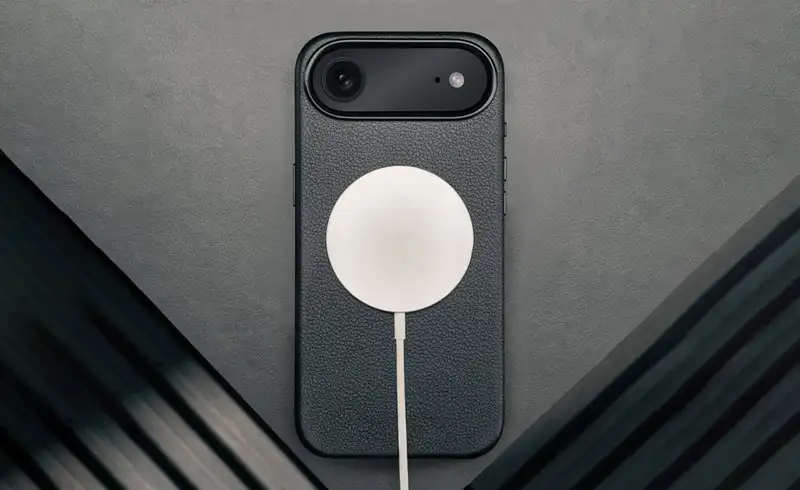
Both Mayo and Rossignol managed to "revive" the iPhone by placing it on a MagSafe charger (or MagSafe battery pack) and waiting 10–15 minutes. After that interval, the phone takes a charge, boots up, and USB-C starts working normally. The bug only appears on the first charge after a complete drain.
Apple — no comment, no fix in iOS 26.4.1 or 26.4.2
The two updates released after the bug became public (iOS 26.4.1 from 8 April and iOS 26.4.2 from 23 April) do NOT fix the issue. The community is waiting for a fix in iOS 26.5 — not officially confirmed.
Confirmed affected models
All 4 variants in the iPhone 17 range are publicly confirmed as affected. Below, plus our repair prices for cases where the issue is something else (real physical port damage):
| Model | Publicly confirmed | Port repair (if physical) |
|---|---|---|
| iPhone 17 (base) | Yes, multiple Reddit users | 600 RON |
| iPhone Air | Yes, first reported case (Mayo, 9to5Mac) | 700 RON |
| iPhone 17 Pro | Yes, confirmed by MacRumors (Rossignol) | 900 RON |
| iPhone 17 Pro Max | Yes, in the MacRumors article | 900 RON |
Prices VAT included. On iPhone 17e — no public reports yet, but it's the same hardware design, so it's plausible it could be affected too.
Workaround — 5 steps to boot it at home
The process is simple and free. Works in the vast majority of reported cases.
Put the phone on MagSafe — NOT on USB-C
Use any certified MagSafe charger (Apple, Anker, Belkin, etc.) or a portable MagSafe battery. Place the iPhone back-side on the magnetic pad and make sure it "snaps" correctly (the magnetic circle auto-centres).
Leave it for 10–15 minutes without touching it
In the first minutes you may see nothing on the screen. That's normal for this bug — the battery is too drained for the firmware to respond instantly. Patience is key. DO NOT try pressing buttons or switching cables during this window.
After 10–15 minutes, the Power button responds
Press the side button. The Apple logo appears, the phone boots normally. Leave it for another 30+ minutes on MagSafe to build up enough battery for use.
Once on, USB-C works again
The bug is strictly tied to the "resurrection from 0% battery" moment. Once the iPhone has booted (via MagSafe), you can go back to the USB-C cable and charge normally. It won't repeat unless you let the battery drain fully again.
Prevention going forward — don't let the battery go below 5%
The simplest remedy is to never get into this situation. Optimized Battery Charging enabled (default) + the habit of plugging in when you see 20% — and you'll never hit the bug.
Why the firmware theory is plausible
Apple confirmed nothing, but industry technicians speculate plausibly. On iPhone 15 and newer, the USB-C port isn't just a passive connection — it's managed by a dedicated controller (USB-C Power Delivery) that "negotiates" with the cable/charger the power protocol (5V vs 9V vs 20V), the max current, and authenticates the charger.
This negotiation happens at the moment of connection. If the battery is too drained, the controller doesn't have enough residual current to start its firmware and do the negotiation — result: USB-C stays inactive. MagSafe goes through a completely different circuit (induction coil + dedicated chip), which starts up even if the main PMIC can't negotiate USB-C yet. That explains why MagSafe "saves" the iPhone.
Why it's a bug and not a feature: on iPhones with USB-C before (15, 16) the same scenario works — they charge anyway, even from 0%. The new behaviour on the iPhone 17 series is a regression, probably in a firmware change introduced for the new models.
When it's SOMETHING ELSE — signs it's not this bug
Before you go to forums or buy a MagSafe pack, check that your symptom is exactly the bug described. Here are the signs it's a different problem — one that does require service:
iPhone doesn't turn on even on MagSafe
The bug described here resolves with MagSafe in 10–15 minutes. If your MagSafe can't boot it after 30+ minutes, it's a different problem: defective battery, hardware damage to the PMIC (power management chip) or the logic board. Service needed here.
USB-C port with visible physical damage
Bent connector, stuck pins, deep lint or dust, liquid ingress — these are physical causes separate from the software bug. The symptom is similar (USB-C won't charge), but the fix needs port repair, not a MagSafe workaround.
USB-C cable works intermittently (jiggling)
If it sometimes charges, sometimes not, or you need to hold the cable at a specific angle — it means worn / loose connector. The bug described in the article doesn't have this symptom — it's binary (won't turn on at all from 0% via USB-C, but then works fine once on).
Liquid Contact Indicator triggered
An iPhone exposed to liquid can refuse to charge as a protective measure. Apple checks the LCI (Liquid Contact Indicator) and can refuse warranty service. Professional ultrasonic cleaning is needed here.
What we do in this context
This article is built to save you a wasted service visit. But we're here for the cases where the workaround doesn't fix it:
✓ USB-C port component-level repair — for real physical damage (loose, liquid, bent port). Prices: 600 RON (iPhone 17), 700 RON (iPhone Air), 900 RON (iPhone 17 Pro / Pro Max). See the full list.
✓ Battery/PMIC diagnostic if MagSafe doesn't rescue it even after 30+ minutes.
✓ Ultrasonic cleaning if there's liquid contamination in the port.
✓ For iPhone under Apple warranty — we recommend Apple Authorised Service Provider first, it's free for you.
Frequently asked questions
Is it a software or hardware bug?
Which models are actually affected?
I'm under Apple warranty. Will they replace my phone?
Will iOS 26.5 fix the bug?
Can I use a different USB-C cable to solve it?
What does Radical Service do in this case?
How long does USB-C port repair take at your shop?
I have an iPhone Air and the USB-C port got bent. Can it be fixed?
Sources
- MacRumors — Some iPhone 17 Pro and iPhone Air Users Experiencing a Charging Issue (Joe Rossignol, 30 April 2026)
- 9to5Mac — original report by Benjamin Mayo (primary source of the story)
- MacRumors Forums — Community discussion with 75+ comments and confirmations
- Apple Community — multiple threads reporting the same symptom on iPhone 17 Pro and 17 Pro Max