
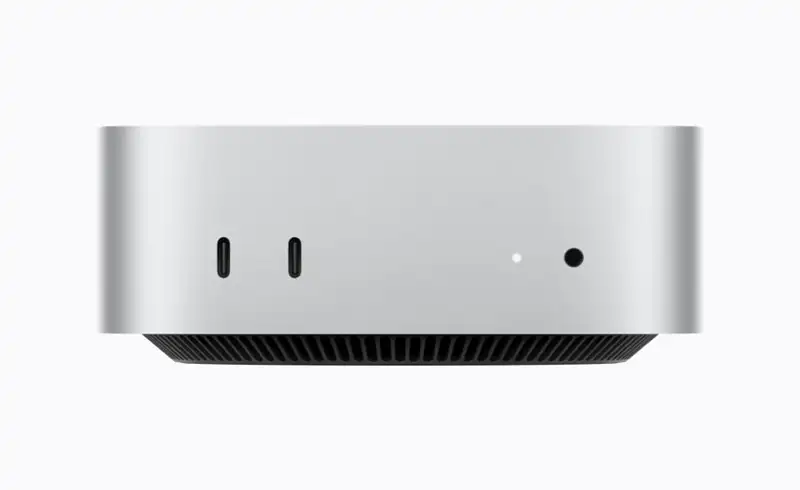
Mac mini — now with M6 or M5 Pro
Mac mini remains Apple\'s most versatile desktop, and the new generation makes a big leap especially on the AI side. There are two very different configurations, for two types of users:
Mac mini with M6
Mac mini with M5 Pro
Mac Studio — M5 Max or M5 Ultra, the most powerful Mac ever
If the Mac mini is „the little one that does it all", the Mac Studio is the absolute peak. M5 Ultra brings, for the first time, Neural Accelerators to an Ultra chip and pushes unified memory to 512GB — AI-server territory, on your desk:
Mac Studio with M5 Max
Mac Studio with M5 Ultra
„Wait, why does the Mac mini have M6, but the Mac Studio only M5 Max/Ultra?" It isn\'t a mistake. Apple launches the base chip of a new generation first (M6), while the bigger variants (Pro, Max, Ultra) arrive staggered, because they\'re far more complex. So M6 is newer as a generation, but M5 Ultra is, in absolute terms, far more powerful. You saw the same pattern with M1/M1 Ultra and M3/M3 Ultra.
What actually matters from this launch
Beyond the marketing numbers, here are the real changes that make a difference in use:
Neural Accelerators built into the GPU
The most important architectural change: every GPU core now has a dedicated accelerator for matrix multiplication (the basis of AI). That's where the big gains on running local models come from — you no longer depend on the cloud for LLMs, with full privacy.
Unified memory taken to the extreme
Mac Studio with M5 Ultra reaches 512GB of unified memory with 1.2TB/s bandwidth. Practically, you can load enormous (frontier-class) AI models straight on your desk. For comparison, Mac mini M6 starts at 16GB — two different worlds for two different types of users.
Thunderbolt 5 + clustering
Both Mac Studios (and Mac mini M5 Pro) have Thunderbolt 5 (120Gb/s). New: you can cluster multiple Mac Studio units via TB5 + RDMA — four systems = up to 3× the speed for distributed AI inference. A mini data center on your desk.
PCIe Gen 6 SSD (Mac Studio)
Storage up to 2× faster, with a next-generation SSD architecture on PCIe Gen 6. It matters when loading big projects and large AI models. Note, though: it remains proprietary Apple storage (see the repairability section).
Wi-Fi 7 and Bluetooth 6 (Apple N1 chip)
For the first time on Mac Studio, via the Apple N1 chip. Plus 2.5Gb Ethernet on Mac mini (10Gb optional). Connectivity ready for heavy data flows.
Genlock over USB-C
Precise synchronization between a display and a professional camera (including iPhone 17 Pro). A niche detail, but important for video production and studios.
Repairability — what to know before you buy
This is the part Apple doesn\'t put on the poster, but an honest shop tells you directly. On Apple Silicon Macs, two things are fixed for life:
RAM CANNOT be upgraded later
Unified memory is integrated into the Apple chip package — it's physically part of the SoC. There are no slots, no upgrade after purchase, on any model. Practical conclusion: choose how much RAM you need for the long term from the start. It's the one decision you can't change.
Storage (SSD) — proprietary and paired
Even though the Mac Studio SSD is modular, it isn't a standard NVMe — these are proprietary Apple modules, paired with the board through the security controller. You can't fit a PC SSD, and replacement requires a procedure + correct configuration. Like RAM: buy the capacity you need.
What can be repaired
The power supply, fans, ports, certain board components (board-level, via microsoldering), and data recovery are all repairable. A Mac mini or Mac Studio with a power problem or a burned port isn't „a write-off" — it's fixed at the component level.
Why it matters at purchase
Because RAM and SSD can't be changed, the configuration you choose today is the one you'll have in 5 years. It's worth paying more for memory and storage now than regretting it later. We can honestly advise which configuration makes sense for what you do — without pushing you toward the most expensive one.
Our honest advice: because RAM and storage can\'t be changed, pay more now for the memory and SSD you\'ll need in 4-5 years — it\'s cheaper than buying another Mac sooner. If you\'re not sure which configuration fits you, ask us; we\'ll tell you honestly what makes sense for what you do, without pushing you toward the most expensive option.
What it means for the Romanian buyer
Availability and price in Romania
Pre-orders start today (August 25, 2026), deliveries from September 22; the 512GB Mac Studio configuration arrives in late October. The prices above are the official U.S. ones, WITHOUT taxes. On apple.com/ro the final price includes VAT (19%) and regional pricing — usually higher than a simple conversion of the U.S. price. Check the exact price on apple.com/ro before ordering.
What happens to older models
As with every launch, prices of the Mac mini M2/M4 and Mac Studio M1/M2/M3 Max/Ultra will drop on the second-hand market in the coming months. If you want a good Apple desktop at a fair price and don't need extreme local AI, a used Mac mini M4 or Mac Studio M2 Max becomes an excellent deal toward the end of 2026.
Already have a Mac mini/Studio? Don't rush
If you have a working Mac mini M2/M4 or a Mac Studio M1/M2 Max and you don't run heavy local AI models, the leap doesn't necessarily justify the cost. Fast external storage (Thunderbolt) or simply keeping your current setup is often more rational. We'll tell you honestly whether it's worth it.
Frequently asked questions
Why does the Mac mini have M6, but the Mac Studio only M5 Max and M5 Ultra?
What does „unified memory" mean and why does it matter so much?
Can I upgrade my RAM or SSD later, at a repair shop?
Do you repair Mac mini and Mac Studio at Radical Service?
Is it worth getting a Mac mini M6 now or waiting?
Do the new Macs run macOS 27?
Related resources from our site
We\'ve written articles that complete the context of this launch and the Mac ecosystem:
- MacBook without macOS 27 support — macOS 27 is the first Apple Silicon-only release; what to do with an Intel Mac
- Display Locked to Owner — how to spot stolen parts on Macs
- iPhone 18 Pro Max — the 20% display cost cut — the economics behind Apple hardware
- iOS 27 — 3 lock systems — the context of Apple\'s control over devices
- MacBook „burned CPU" — myth vs reality — what gets repaired board-level on a Mac