
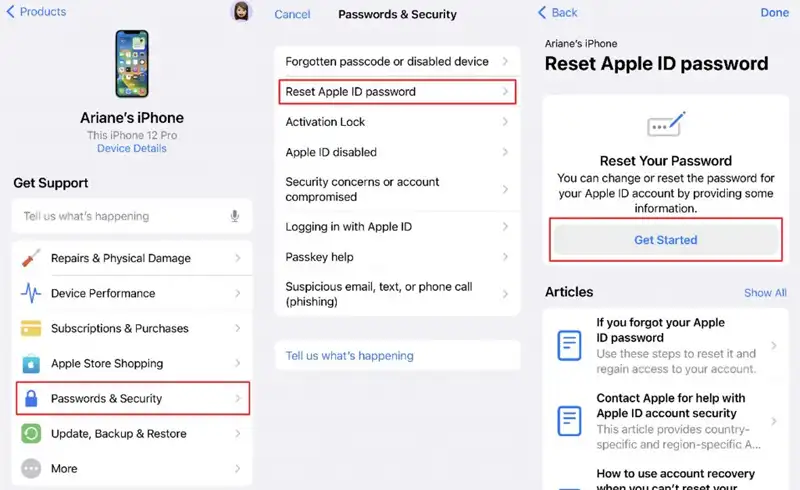
The 5 official recovery methods (in difficulty order)
Start with Method 1. If it doesn\'t apply to your situation, move to Method 2, and so on. Apple designed this system so that 80% of cases resolve in Methods 1-2.
You have access to a trusted device (signed-in iPhone, iPad or Mac)
When it applies: You forgot the password but your phone is with you, signed into Apple ID. The standard case 80% of situations.
Steps:
- iPhone/iPad: Settings → [your name] → Sign-In & Security → Change Password.
- Mac: System Settings → [your name] → Sign-In & Security → Change Password.
- Enter the device unlock code as verification (NOT the old Apple ID password).
- Set a new password. Min 8 characters, uppercase + lowercase + number. iOS will suggest a safe one.
- All signed devices will ask for the new password at next login. Save in Keychain or password manager.
Note: FASTEST METHOD. Always use this if your device is available.
Use iforgot.apple.com from any browser
When it applies: You forgot the password, not signed in on any device, but you have access to the trusted phone number and email.
Steps:
- Open iforgot.apple.com from any browser (computer, partner phone, internet café).
- Enter the Apple ID (email). Continue.
- Apple sends you a verification code via SMS to the trusted number (or on another device if it appears).
- Enter the code → Apple lets you set a new password.
- IMPORTANT: if you see "Account Recovery Required" — skip to Method 4 (Account Recovery).
Note: Works if trusted phone numbers are current. Check the list: Settings → [Apple ID] → Sign-In & Security → Trusted Phone Numbers.
Use Recovery Contact (iOS 26+)
When it applies: You forgot the password, no access to trusted devices OR phone numbers. You DID configure a Recovery Contact before the problem.
Steps:
- The recovery contact person enters Settings → [their name] → Sign-In & Security → Account Recovery.
- Selects your name from the list of people for whom they're a Recovery Contact.
- Requests a Recovery Code — Apple sends them a 6-digit code.
- The person communicates that code to you (phone, SMS, in person).
- You enter the code on iforgot.apple.com → reset password.
Note: RECOMMENDED SETUP: add a Recovery Contact BEFORE you need it. This can save your account in case of stolen phone without backup.
Account Recovery (formal Apple procedure — 5-7 days)
When it applies: No access to devices, NO recovery contact, lost phone numbers (changed carrier, stolen phone without SIM backup).
Steps:
- Go to iforgot.apple.com → try recovery → get "Account Recovery" message.
- Enter as much information as possible: devices you used (serial number ideal), old phone numbers, alternative emails, Apple Watch/MacBook purchase date etc.
- Apple analyses the request. Minimum period: 5-7 days (sometimes up to 14 days if information is incomplete).
- Apple sends you email with recovery code ONLY on the last day of the period. You CANNOT shorten the process.
- With the code, reset password and regain access.
Note: SYSTEM CRITIC: long time is intentional — Apple offers the window for the real owner to cancel recovery if a thief tries. Disadvantage: temporary account loss for 5-14 days.
Physical Apple Store with ID
When it applies: You escaped from all scenarios above. Last chance: ID + proof of purchase + person at Apple Store.
Steps:
- Book at apple.com/shop/personal-pickup or call your nearest Apple Store directly (in Romania: Apple via Apcom Băneasa).
- Bring with you: ID or passport, proof of Apple device purchase (invoice, contract), possibly first email confirmation for account.
- Genius does account recovery in the system. Verifies identity physically + account information.
- If they verify everything — get password reset link immediately. If documentation missing — directed to formal Account Recovery (Method 4).
Note: IMPORTANT: There's no official Apple Store (corporate) in Romania. Apcom Băneasa is authorised AASP and can help with recovery, but doesn't have all the powers of a US Genius Bar.
6 difficult scenarios (rare but critical)
Special situations that require different approach. Check if you\'re in any before wasting time with standard methods.
⚠︎ Phone stolen, no other Apple device, no Recovery Contact backup
URGENT steps: (1) Open iCloud.com from any browser (hotel computer, friend) → Find My → "Mark as Lost" + optional "Erase iPhone". This blocks the physical device. (2) Call mobile carrier immediately → request IMEI block (prevents SIM sale). (3) Start Account Recovery on iforgot.apple.com (5-7 days waiting). (4) Report to police with IMEI (saved at backup, hopefully). (5) With police report + ID, in 5-7 days you can reset password and stop Apple Pay/iCloud account loss.
2FA number is old/inactive (changed carrier)
If you have access to trusted device (signed iPhone/Mac): Settings → [Apple ID] → Sign-In & Security → Trusted Phone Numbers → add new number, delete old one. If you DON'T have access — single option: Account Recovery (5-7 days). LESSON: change number → ALWAYS update trusted numbers BEFORE disconnecting old carrier.
Account blocked after multiple wrong password attempts
Account locked automatically for 24 hours. Wait. Then try reset via iforgot.apple.com. If still "locked" after 24h: contact Apple Support (1-800-MY-APPLE for US or via Apple Support app from another signed iPhone). Specify: "My account is locked, I need security verification". Genius support will verify identity and unlock manually.
Child can no longer sign in (Family Sharing account)
Family Organizer (parent) goes to iCloud.com or Settings → Family → [child] → Reset Password. This works ONLY if the child is under 13 (or 18 in EU) and in family. For children over age, the account becomes independent and can no longer be reset by parent.
Apple ID shared with former partner — I want to recover JUST my part
Apple ID cannot be "split". Solution: (1) Create new account with your email, (2) Migrate data manually (export contacts, photos, messages), (3) Move subscriptions (iCloud+, Apple Music, AppleCare) to new account — requires contacting Apple Support. You CANNOT recover purchases (apps, music, movies) if they were made on the old account. PREVENTION: NEVER share Apple ID, use Family Sharing for shared media.
Apple ID with custom domain (iCloud+ Custom Domain)
If you use iCloud+ with custom domain (e.g.: [email protected]) and lost access: recovery is more complex because Apple can't verify the domain. Solution: (1) Verify domain DNS still points to Apple (TXT record), (2) Verify domain admin email still works, (3) Contact specialised Apple Support (1-866-752-7753 — special line). Process takes 7-14 days.
6 prevention measures to take NOW
The most important 6 settings that save your account in the future. Do them once — 15 minutes total — and avoid 14-day recovery drama.
Add Recovery Contact NOW
iOS 26: Settings → [your name] → Sign-In & Security → Account Recovery → Recovery Contact. Add 1-2 close people (partner, parent, sibling). They become "key holders" for recovery. You DON'T give them the password — only the right to send you a code when needed. This single step prevents 90% of dramatic situations.
Generate and save Recovery Key
Settings → [Apple ID] → Sign-In & Security → Recovery Key → Turn On → receive 28-character code. Write it on PAPER (NOT in iCloud, NOT in Notes on iPhone) → put in safe place (safe, bank safety deposit box). With Recovery Key, you can reset password WITHOUT Account Recovery (instant).
Add 2+ trusted phone numbers
Settings → [Apple ID] → Sign-In & Security → Trusted Phone Numbers. Besides your number, add a trusted person's (partner, parent). This means you can receive 2FA code on another number if you lose your phone.
Save Apple ID in password manager
1Password, Bitwarden, or Keychain (default iOS). Add: Apple ID email, current password, recovery key (with note "use only emergency"), 2FA numbers. If you have access to password manager on another device, you have access to account.
Photo documentation of IMEI and serial number
Take photo of iPhone box (with IMEI visible) and back of MacBook (with serial number). Save photos in iCloud Drive AND in alternative email account (Gmail, Outlook). In case of theft + recovery: with IMEI and serial you can prove ownership to Apple Support.
Activate AppleCare+ (decisive for recovery)
With active AppleCare+, Apple Support can directly access your case with higher priority. Plus: purchase documents are in the system, you don't need to prove ownership. Costs 250-350 RON/year but save dozens of hours in case of recovery.
Fake "Apple ID Unlock" services — avoid at all costs
Search "reset Apple ID without password" on Google and dozens of "Apple ID Unlock" services appear at $50-200 USD. ALL are scams or illegal. The ones that work (rare) bypass Activation Lock by: (1) using a vulnerability Apple closes any time, (2) accessing stolen iCloud Lock databases, (3) social engineering Apple Support — all illegal. Risks: money loss ($50-200 USD irrecoverable), phone that works 1-3 months then closes again (Apple invalidates jailbreak), data theft (give them access to device with photos, messages), criminal complicity risk (if device was stolen).
The only LEGITIMATE and SAFE method: the official Apple procedures from this article. Yes, it takes time. Yes, it\'s frustrating. But it works and doesn\'t leave you with a bricked device after 3 months.
Frequently asked questions
How long is minimum Account Recovery if I have no simple options?
Do I lose purchases (apps, music, movies, iCloud storage) if I reset password?
Can I reset Apple ID password from abroad?
My Apple ID has been hacked (password changed without my will). What do I do?
Can you (Radical Service) help with Apple ID recovery?
Useful resources
- Pre-vacation checklist — backup and Find My security
- Parts from stolen dismantling — real risks
- Apple terms glossary — Activation Lock, Find My, Secure Enclave explained
- Used iPhone checklist — iCloud Lock verification
- iforgot.apple.com — official recovery page
- Apple Support — official Account Recovery