
The recommendation, in short
- 1. Mac with 8 GB RAM or a 256 GB SSD, still on macOS 26: stay on 26 and install only the security updates.
- 2. Wait for macOS 27.2 (end of October or early November), see what others with Macs like yours report, free up space and only then decide.
- 3. Already updated? Below are the steps that ease most of the trouble.
Why base Macs in particular
macOS 27 problems show up on all kinds of Macs. The difference is how much they hit you. On a Mac with plenty of memory and storage, many go almost unnoticed. On a base one, the same problems pile up on top of each other.
💾 Storage disappears
macOS 27 automatically downloads the Apple Intelligence models, with no opt-out, and reviews mention tens of GB of extra space reserved for the system. On 256 GB, that’s a serious chunk of the whole SSD.
🧠 Memory runs short
With 8 GB, the Mac leans heavily on swap, using the SSD as extra memory. And swap needs exactly the free space that’s missing. The two problems make each other worse.
🎨 The effects cost resources
Liquid Glass loads the GPU and memory. On base Macs you see more stutter, glitches and heat, and the battery drains faster.
What we saw
We installed macOS 27 on a Mac mini M4 with 16 GB and 256 GB, a Mac that, with 16 GB, isn’t even the weakest of the base models. We had graphics glitches that forced us to turn the effects off, apps that wouldn’t launch, memory use of at least 12 GB with nothing special open and a system cache of more than 70 GB that filled the SSD. The details are in our macOS 27.0.1 article.
If that happens on 16 GB, a MacBook Air with 8 GB and 256 GB has even less margin.
What other users report
- • Collapsed battery life: an OS X Daily author writes that his MacBook Air’s battery dropped to just over 2 hours after macOS 27, with the Mac sluggish and hot.
- • Choppy scrolling: MacBook Air M5 owners describe stuttering scrolling on heavier websites, which wasn’t there on macOS 26.
- • Unstable Mission Control: a MacBook Air M1 user says the system is faster but „a buggy mess”, with Mission Control freezing their Mac twice. Their advice: wait for a fix release.
- • Bloated „System Data”: on r/MacOS there are cases of more than 100 GB of system data on 256 GB Macs, with caches that refill after you delete them.
One thread that says a lot
„macOS 27 has really badly affected my MacBook Air”
That’s the title of a post in the r/MacOS community that drew dozens of replies. The author has had a MacBook Air M2 for just over a year, with no problems until the update. She teaches online classes using only Zoom and PowerPoint. After macOS 27:
- • the battery drops from 100% to 70% in a single hour of teaching;
- • Zoom screen sharing lags, and annotated text and drawings only appear on the second try or vanish;
- • any video plays choppy;
- • the problems persist after almost two weeks, so it’s no longer just post-update indexing, and she has plenty of free storage.
That last detail matters: it’s not only a storage problem. Even on a Mac with a roomy SSD, macOS 27 can use more power and run worse. On a base Mac, the lack of memory and storage comes on top of that.
What others replied:
- • a MacBook Air M3 owner says battery life got „dramatically worse”, and an M3 Max owner says battery on 27 is poor;
- • a MacBook Air M2 user went back to macOS 26 Tahoe because the system was laggy, and several M3 and M4 owners went all the way back to macOS 15 Sequoia and say their Mac is smooth again. One admits the rollback was „a pain”;
- • another stepped back after seeing that Apple Intelligence takes around 18 GB and can’t be declined in settings;
- • on a MacBook Air M4, the
appstoreagentprocess was using heavy CPU and draining the battery, and other users say Spotlight crashed repeatedly.
To be fair, the same thread has happy users too: an M3 owner reports zero problems and a speed-up, an M2 Air owner sees better memory usage, and M1 Air owners say it just works. The experience varies from Mac to Mac. That’s exactly why our recommendation is one of caution: if macOS 26 runs well for you, you have nothing to gain by taking the risk now, especially on a base configuration.
Not even top-end Macs are spared
Another r/MacOS thread shows the problems aren’t only about memory and storage. The author works on a 16" MacBook Pro M3 Max with 128 GB of RAM, running local AI models, DaVinci Resolve and Blender, in other words one of the most powerful Macs there is. On macOS 27 he found:
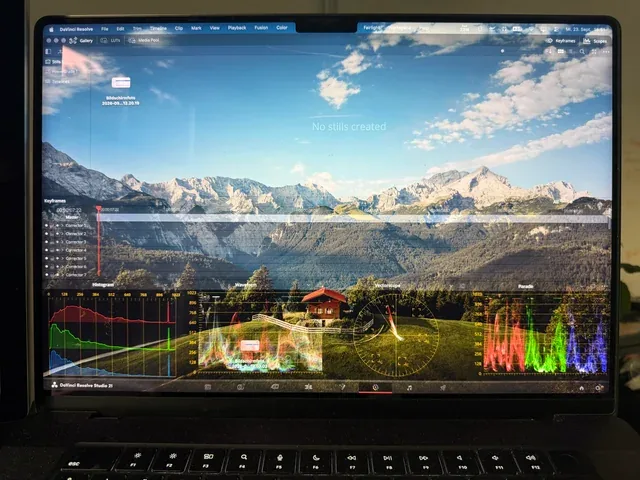
- • transparent windows: maximized windows (not full screen) turn half transparent and stop responding to clicks, in DaVinci Resolve and Premiere Pro;
- • 5 frames per second animations when minimizing a window, with the background dimming and brightening oddly;
- • AirDrop works about one time in four between iPhone, iPad and Mac, and copying on iPhone and pasting on Mac doesn’t work at all;
- • Spotlight searches „Display” and lands him in the menu bar settings, and the Finder Downloads folder overlaps the sort bar.
The replies point the same way: an M4 Pro MacBook Pro with 48 GB is „so laggy”, and three-finger swiping between desktops has become unusable. An M3 Pro is „much laggier”, and on an M1 Pro Handoff doesn’t work and DaVinci drops frames. Several complain about the menu bar reloading jerkily when moving to another monitor and about stuttering scrolling in Safari. An EU user says Apple Intelligence takes up 28 GB on his Mac, even though Siri AI features aren’t even available to him. And one user’s conclusion sounds just like our advice: from now on, only install the .1 or .2 versions.
Here too there are voices with no problems: an M4 Pro MacBook Pro with 24 GB is editing a documentary without issues and couldn’t reproduce the DaVinci bug, and other users say 27 is faster than 26.
What it means for you: if a 128 GB Mac has bugs like these, they come from the .0 release of the system, not just the hardware. On a top-end Mac they’re annoying. On a base Mac, they pile on top of the lack of memory and storage. And 27.0.1 announced fixes for none of them.
How to stay safe on macOS 26
Holding off on the major version doesn’t mean going without protection. Apple keeps publishing security updates for macOS 26: 26.7.1, released alongside 27.0.1, even fixed an actively exploited vulnerability.
Install the security updates
The 26.x versions are safe to install. Just don’t click „Upgrade Now” for macOS 27.
Check automatic updates
System Settings → General → Software Update → Automatic Updates. Keep Security Responses and system files turned on.
Already updated? What you can do
First find out what’s using power
Open Activity Monitor, Energy tab, right while the Mac is struggling. Whatever sits at the top is the culprit, no guessing needed. Watch especially for appstoreagent, Spotlight and third-party apps.
Update your apps and redo permissions
Zoom, Office and other apps need new versions for macOS 27. If screen sharing acts up, remove the app from System Settings → Privacy & Security → Screen Recording and add it again.
Tone down the visual effects
The Liquid Glass slider toward „tinted”, plus System Settings → Accessibility → Display → Reduce Transparency and Reduce Motion. It eases the load on the GPU and memory.
Turn off Apple Intelligence if you don’t use it
System Settings → Apple Intelligence & Siri. There are also Terminal tools that remove it completely, but only use them if you know exactly what you’re doing. Don’t delete files from system folders by hand.
Free up space, carefully
Use a disk analyzer (DaisyDisk, Mole, OnyX) to see exactly what „System Data” is before deleting anything. On an 8 GB Mac, free space is also backup memory.
Leave it plugged in for a few nights
Post-update indexing and caches use a lot. Keep the Mac connected, on and not sleeping for a few nights in a row. Fully quit apps you’re not using (Cmd+Q, not just the window) and restart it now and then.
Reinstall macOS 27 over itself
If the problems remain after a week, you can reinstall the system from Recovery without erasing your data. Still, make a backup first.
Get ready for 27.2
Make a backup now and install 27.2 when it arrives, after you see the first reactions.
Going back to macOS 26 Tahoe or even macOS 15 Sequoia is possible, and many have done it, but it means fully erasing the Mac and restoring your data from a backup. If you choose that route and don’t want to risk your data, we can do it for you in our service center.
The lesson for your next Mac
On Apple Silicon Macs, memory and the SSD are soldered to the board: you can’t upgrade them later. Every new macOS version asks for more, and AI features running locally ask for even more. If you’re buying a Mac now that you want to use for many years, 16 GB of memory and 512 GB of storage are a far calmer choice than the minimum configuration.
Radical Service: services and guides
Sources: OS X Daily (battery), MacRumors Forums (scrolling), MacRumors Forums (stability), r/MacOS (MacBook Air), r/MacOS (System Data), Tom’s Guide (storage and Apple Intelligence), Eclectic Light (update timeline), MacRumors (27.0.1 and 26.7.1), r/MacOS (MacBook Pro M3 Max), Ars Technica (removing Apple Intelligence). User reports are not confirmed by Apple, and the experience varies from Mac to Mac.