
Logic board MacBook Pro 16 A3403 Real workshop case 8 min read Preferred source in Google

Wet and „cleaned” by a friend: why the Wi-Fi module is no ordinary part

A 16" MacBook Pro with M4 Pro, model A3403, had a run-in with liquid. The owner’s first move was the one many people make: „I know a guy”. The laptop was cleaned and powered on, but Wi-Fi no longer worked. It reached us with a failed Wi-Fi module, a repair that, as far as we know, no other repair shop in Romania does.

Alex Neacșu: Founder, Radical Service
Founder, Radical Service
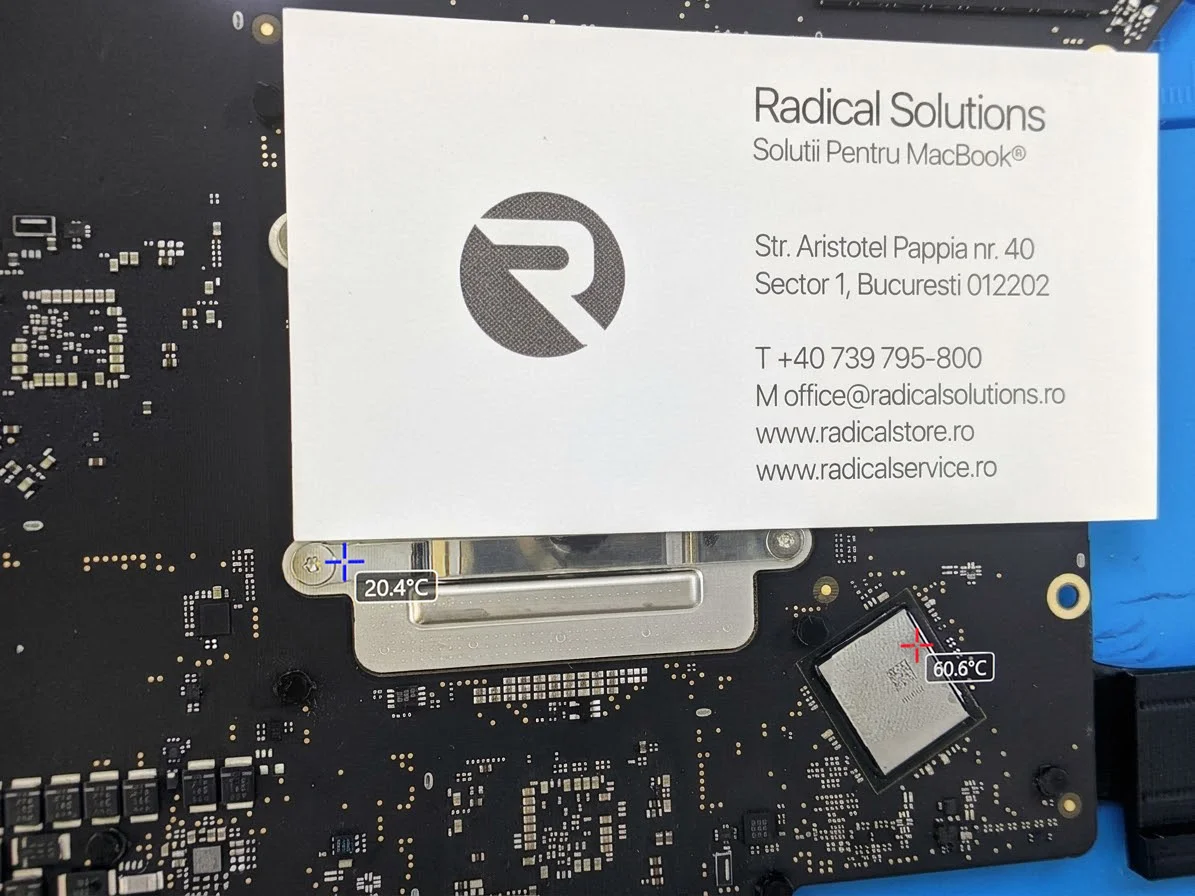
Thermal camera diagnostics MacBook Pro 16 A3403 logic board under the thermal camera: one chip at 60.6°C versus 20.4°C in the reference area
The board under the thermal camera: one chip reaches 60.6°C while the reference area sits at 20.4°C.

A3403

MacBook Pro 16, M4 Pro

60.6°C

hot spot found on the board

Wi-Fi + BT

in the same module

Programming

separate, on a dedicated programmer

The symptoms: the Mac can’t see any network

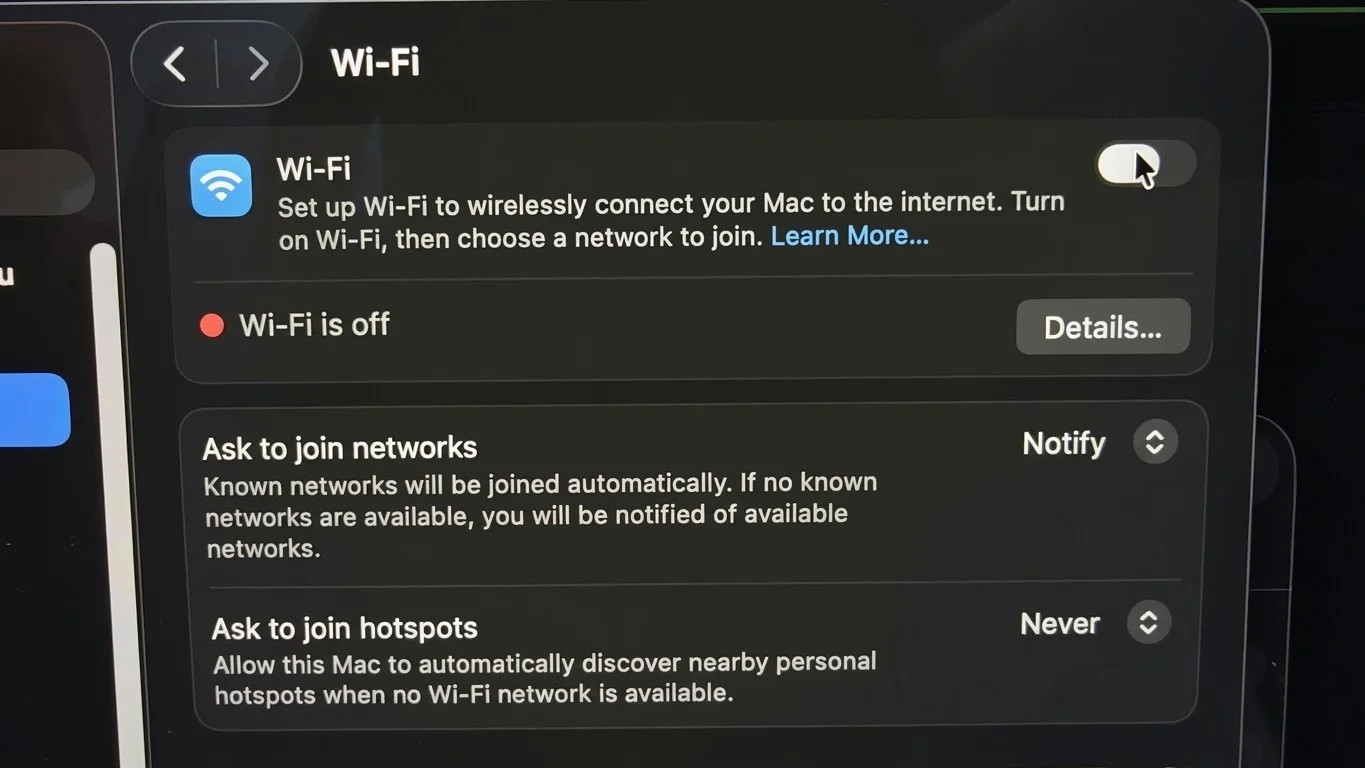
After the „cleaning”, the laptop booted and seemed fine. Except that during setup it got stuck looking for networks without finding any. And in Settings, the Wi-Fi toggle wouldn’t stay on: „Wi-Fi is off”, no matter how many times you tried.
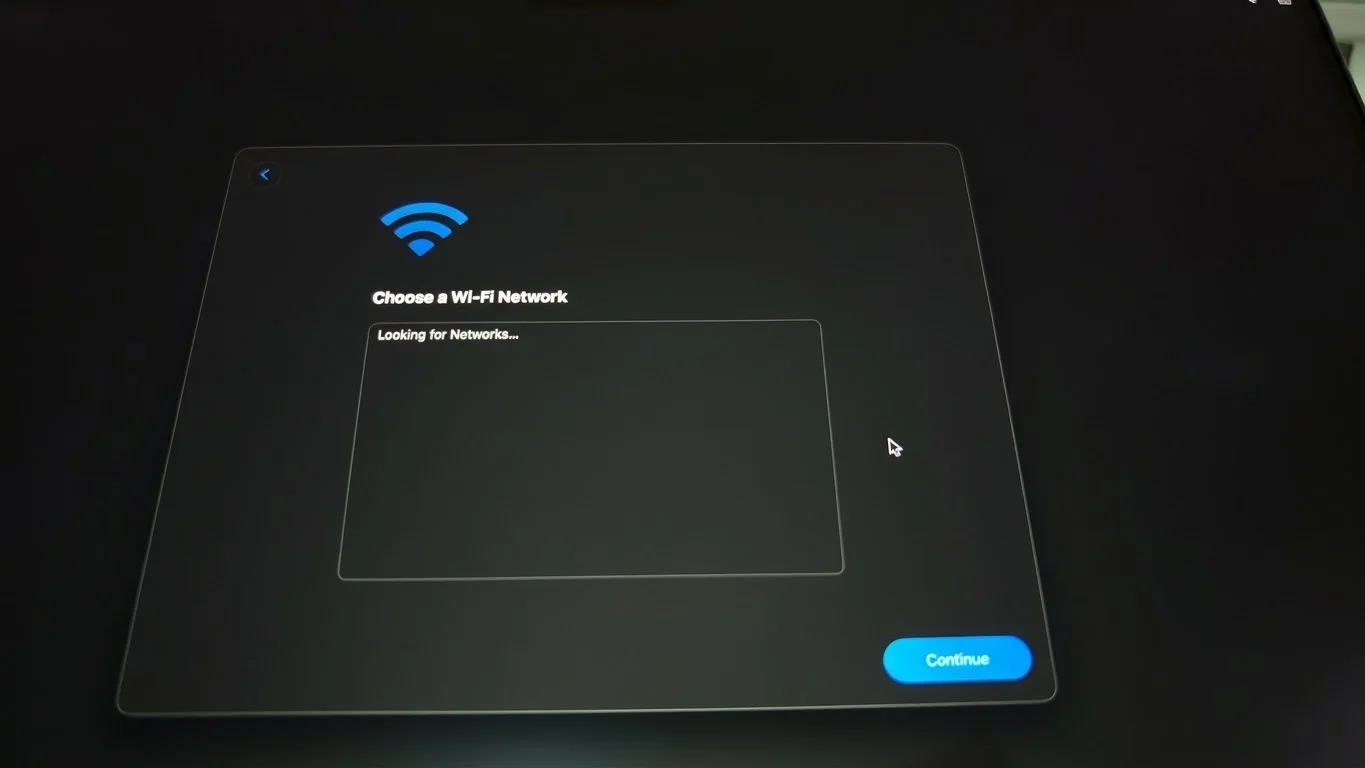
„Looking for Networks...” macOS setup screen stuck at Looking for Networks, no network found
During setup, the Mac searches for networks endlessly and finds none.
„Wi-Fi is off” macOS Wi-Fi settings: Wi-Fi is off, the toggle won’t stay on
In Settings, Wi-Fi stays off no matter how you try to turn it on.

„I know a guy”: why a surface clean isn’t enough

A wet laptop that boots after cleaning isn’t necessarily a repaired laptop. Liquid leaves residue that keeps corroding under components and under the resin some chips are secured with, where a brush and a bit of alcohol can’t reach.

Done properly, it looks like this: the board fully removed, an ultrasonic bath, inspection under the microscope and component-level diagnostics. Without that, the problem is only postponed and often gets worse.

How we found the fault: the thermal camera

A MacBook Pro board has thousands of components, and after liquid damage the fault can’t be seen with the naked eye. That’s why we don’t guess and don’t swap parts „on luck”. We power the board and look at it through a thermal camera: a faulty or shorted component draws current without doing anything useful and heats up, and the camera shows it immediately.

That’s exactly what the photo at the top shows. The reference area next to the connector sits at 20.4°C, room temperature. The chip marked in red reaches 60.6°C, three times as much, even though the laptop is doing nothing. A hot spot like that tells us precisely where the problem is, before we take anything apart or solder anything.

20.4°C

Reference area: the board at rest, at room temperature.

60.6°C

The suspect chip: heating up for no reason, a sign of a fault or a short.

0 parts

swapped at random. We know what we’re repairing before we start.

Why the Wi-Fi module isn’t an interchangeable part

On older laptops, the Wi-Fi card was a separate little board held by a screw. You took it out, put another in, done. On Apple Silicon MacBooks, it’s a completely different story.

Soldered to the logic board

The module is soldered directly onto the logic board, with hundreds of solder points underneath, and secured with resin. Removing it means clearing the resin and applying controlled heat without harming the surrounding components.

Programmed separately

A new module doesn’t work just because it’s soldered on. It has to be programmed separately, on a dedicated programmer, with the data that ties it to that specific Mac. Otherwise, the system won’t accept it.

Wi-Fi and Bluetooth together

On Apple Silicon, Wi-Fi and Bluetooth live in the same module. When one goes, the other usually goes too. A new, correctly programmed module brings both back.

Apple’s official fix for a failed Wi-Fi module is replacing the entire logic board. On a 16" MacBook Pro with M4 Pro, that’s one of the most expensive repairs there is, for a problem sitting in a single module.

We repair the module: we remove it, clean and prepare the area, program the new module on the programmer, solder it back on and test Wi-Fi and Bluetooth. The original logic board stays in the laptop.

Why not every repair shop can do this

Because it takes several things at once: a thermal camera and diagnostic equipment to find the fault, board-level soldering and rework equipment, a dedicated programmer for Wi-Fi modules and the experience to do it all without damaging the rest of the board. Most repair shops either point the customer to a new logic board or say „it can’t be done”.

As far as we know, we’re the only repair shop in Romania that repairs Wi-Fi modules on Apple Silicon MacBooks. Abroad, the procedure is known in workshops that specialise in logic boards, but it remains a niche repair, precisely because of the programming.

If you’ve spilled something on your MacBook

  • 1. Turn it off immediately and unplug it. Don’t power it on „to see if it works”.
  • 2. Don’t dry it with a hair dryer and don’t put it in rice.
  • 3. Bring it as soon as possible to a repair shop that removes the board and cleans it fully, not just on top.
  • 4. If it’s already been „cleaned” and a new problem shows up, like Wi-Fi, tell us. It helps us know where to look.

Find Radical Service faster in Google

Set us as a preferred source: our repair guides and answers get a “preferred” badge in your Google results and AI overviews.

Add as preferred source
5.0 / 5

What our customers say

1165+ verified Google reviews

"

Am fost foarte incantata de suportul primit aici - am primit explicatii clare despre defectiune, mi s-au oferit optiuni la fiecare pas (cu costuri clare asociate), reparatia in sine a durat relativ putin si sunt multumita vu rezultatul final. Multumesc si succes!

Alina Ionescu

Alina Ionescu

în ultima săptămână

"

Am fost la ei pentru schimbarea display-ului la un iPhone 16 plus și totul a decurs foarte bine. Am ales varianta OEM și sunt mulțumită de rezultat. Au fost rapizi, super profi și foarte amabili. Recomand!

Andreea Zelincu

Andreea Zelincu

în ultima săptămână

"

⭐⭐⭐⭐⭐ Foarte mulțumit de experiență! Au fost amabili, rapizi și profesioniști. Totul s-a rezolvat fără probleme. Recomand cu încredere!

Marian B

Marian B

în ultima săptămână

"

Super profi, am trimis macbook air dimineata, si dupa amiaza era gata (pisele erau pe stoc). In cazul meu totul a decurs bine si rapid. Totul functioneaza bine acum pe laptop. Alin super amabil, conteaza mult asta, din ce in ce mai rar in customer service in Romania. Anyway, recomand acest Service.+++++

Bogdan R.

Bogdan R.

acum 5 luni

"

Am avut o experiență extraordinară la Radical Solutions. Am dus un MacBook Air la care copilul meu ține enorm și, deși era lovit, cu display spart și carcasa deteriorată, echipa a reușit să îl readucă la viață. Faptul că a putut fi reparat și păstrat exact așa cum îl știa a însemnat mult. Oamenii au fost răbdători, atenți și foarte corecți.Comunicarea a fost impecabilă, iar rezultatul final arată ca nou. Se vede că pun suflet în ceea ce fac și că respectă clienții. Mulțumesc mult pentru tot — ați făcut un copil fericit și un părinte recunoscător. Cu siguranță dacă mai am probleme cu alte device-uri Apple aici vin. 🙏🙏🙏

Razvan

Razvan

acum o lună

"

Am schimbat bateria la iPhone 11 Pro considerat vintage de Apple, inclusiv de iStyle si telefonul se comporta excelent. Aici gasiti oameni profesionisti care ofera explicatii detaliate si observatii de calitate. Am facut mult research inainte sa ajung aici si a meritat, mi-au raspuns la orice intrebare pe care le-am adresat-o. Multumesc!

Abagiu Razvan

Abagiu Razvan

acum 2 luni

Frequently asked questions

Why won’t Wi-Fi turn on after my MacBook got wet?

Liquid leaves residue that keeps corroding the logic board even after the laptop looks dry. If it reaches the area around the Wi-Fi module, the Wi-Fi toggle in Settings won’t stay on or the Mac can’t find any network. On Apple Silicon Macs, Wi-Fi and Bluetooth sit in the same module, so they usually fail together.

Can just the Wi-Fi module be replaced on an M1, M2, M3 or M4 MacBook?

Yes, but it’s not a part you simply pull out and swap. The module is soldered directly onto the logic board and secured with resin, and the new one has to be programmed separately, on a dedicated programmer, with the data that ties it to that specific Mac. Apple’s official fix is replacing the entire logic board.

Does Bluetooth work again after the module is replaced?

Yes. On Apple Silicon MacBooks, Wi-Fi and Bluetooth are in the same module, so a new, correctly programmed module brings both back.

Why shouldn’t I clean a wet MacBook myself or through a friend?

Because the problem isn’t on the surface. Residue stays under components and under the resin, where you can’t reach without removing the board, an ultrasonic bath and component-level diagnostics. A surface clean makes the laptop look fine for a few days or weeks while corrosion keeps going underneath.

Will I lose my data if the Wi-Fi module is replaced?

No. The work is done on the logic board but doesn’t touch the storage: your data, apps and settings stay. As with any repair, it’s wise to have a recent backup.

How do you find the faulty component on the logic board?

With a thermal camera. We power the board, and a faulty or shorted component heats up visibly compared with the rest of the board. In this case, one chip reached 60.6°C versus 20.4°C in the reference area. That way we know exactly what we’re repairing, without swapping parts at random.

Your MacBook can’t see Wi-Fi anymore?

Before you accept a new logic board, let us take a look. Often, the problem is in a single module.

40 Aristotel Pappia Street, Sector 1, Bucharest · Mon–Fri 08:30–17:30

Still have a question?

Ask the community on r/ReparatiiApple

Our technicians and other Apple users answer there, in Romanian and English: post your model, the symptom and a photo.

Open r/ReparatiiApple