
Repairs MacBook · logic board 💧 Real workshop case 9 min read Preferred source in Google

Liquid spilled on a MacBook: how serious it gets if you don’t act in time

This guide isn’t about „look what we repaired”. It’s about how fast a glass of water turns into a corroded logic board — and what that can cost. One MacBook Air sat for a month after a spill; by the time it reached us, the board estimate was 2,000 lei and the customer chose to decline. We’ll show you exactly what we saw inside and, more importantly, what you must do in the first minutes so you never end up here.

Alex Neacșu: Founder, Radical Service
Alex Neacșu Founder, Radical Service

Repairing Apple since 2014 · logic board, microsoldering, data recovery · the cases other shops turned down

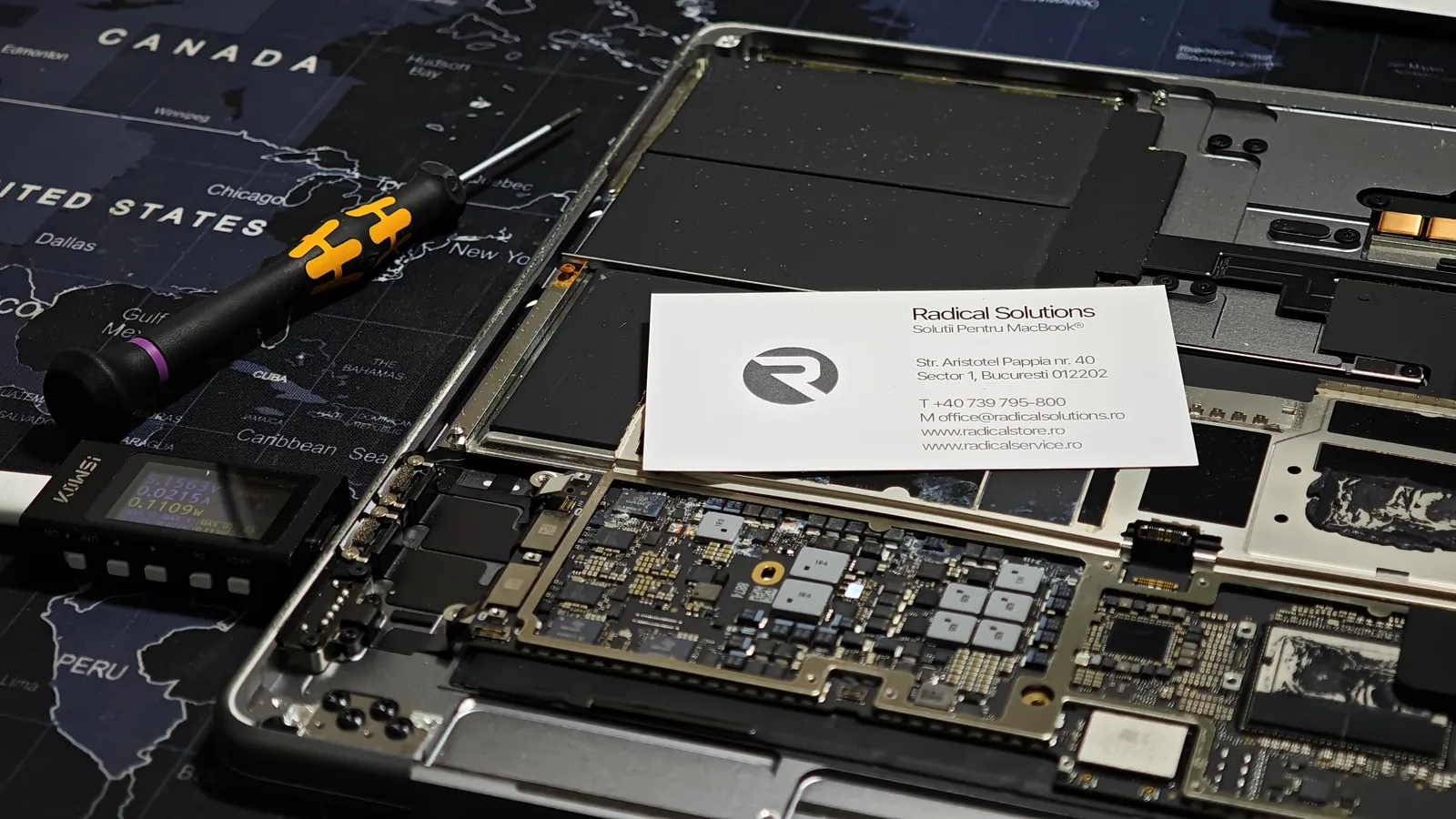
📷 MacBook Air A3114 opened in the workshop MacBook Air 15 M3 (A3114) opened in the workshop, logic board affected by liquid

A3114

MacBook Air 15" M3 (2024)

~1 month

time elapsed after the spill

2,000 lei

logic board estimate (incl. VAT)

Declined

the customer’s decision

The case: a glass of water and a month of waiting

The MacBook in the photos is a MacBook Air 15" with M3 (model A3114, 2024). Water was spilled on it, and then it was set aside — unused for about a month. By the time the owner decided to bring it in, the liquid had done its work: under the metal shields and on the board, clear traces of corrosion and residue had appeared.
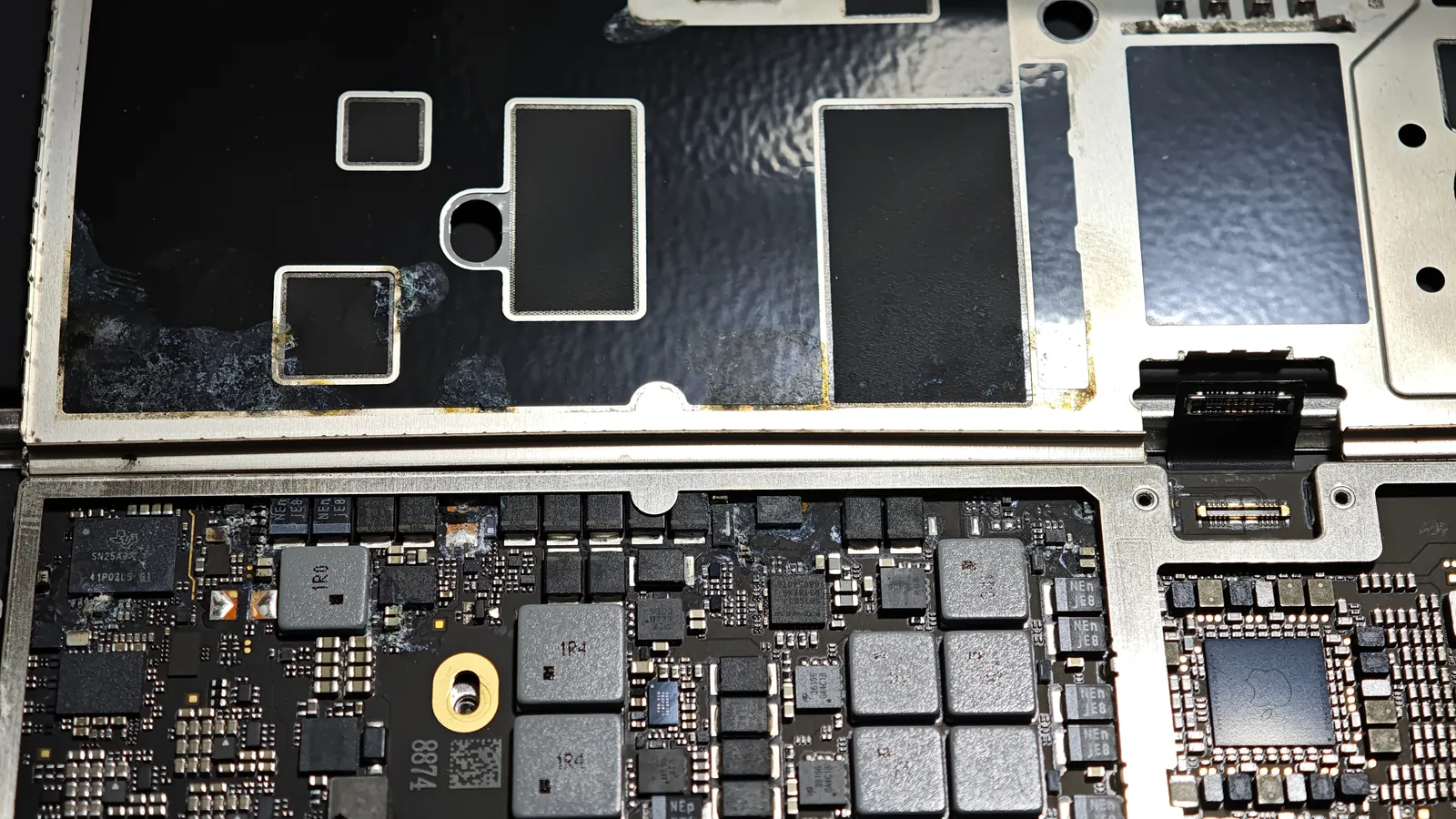
Corrosion on a MacBook Air logic board after liquid contact
Residue and corrosion under the shields — the clear sign the liquid sat and „worked” over time.

The verdict: a logic-board repair (microsoldering) was needed, estimated at 2,000 lei incl. VAT. On top of that, because of how the liquid had spread, we couldn’t guarantee up front that the keyboard would still work perfectly after the repair. The customer didn’t need the data and, weighing the cost against the laptop’s residual value, chose to decline the repair.

That’s why this article isn’t a success story but a warning: this is what a MacBook brought in too late looks like.
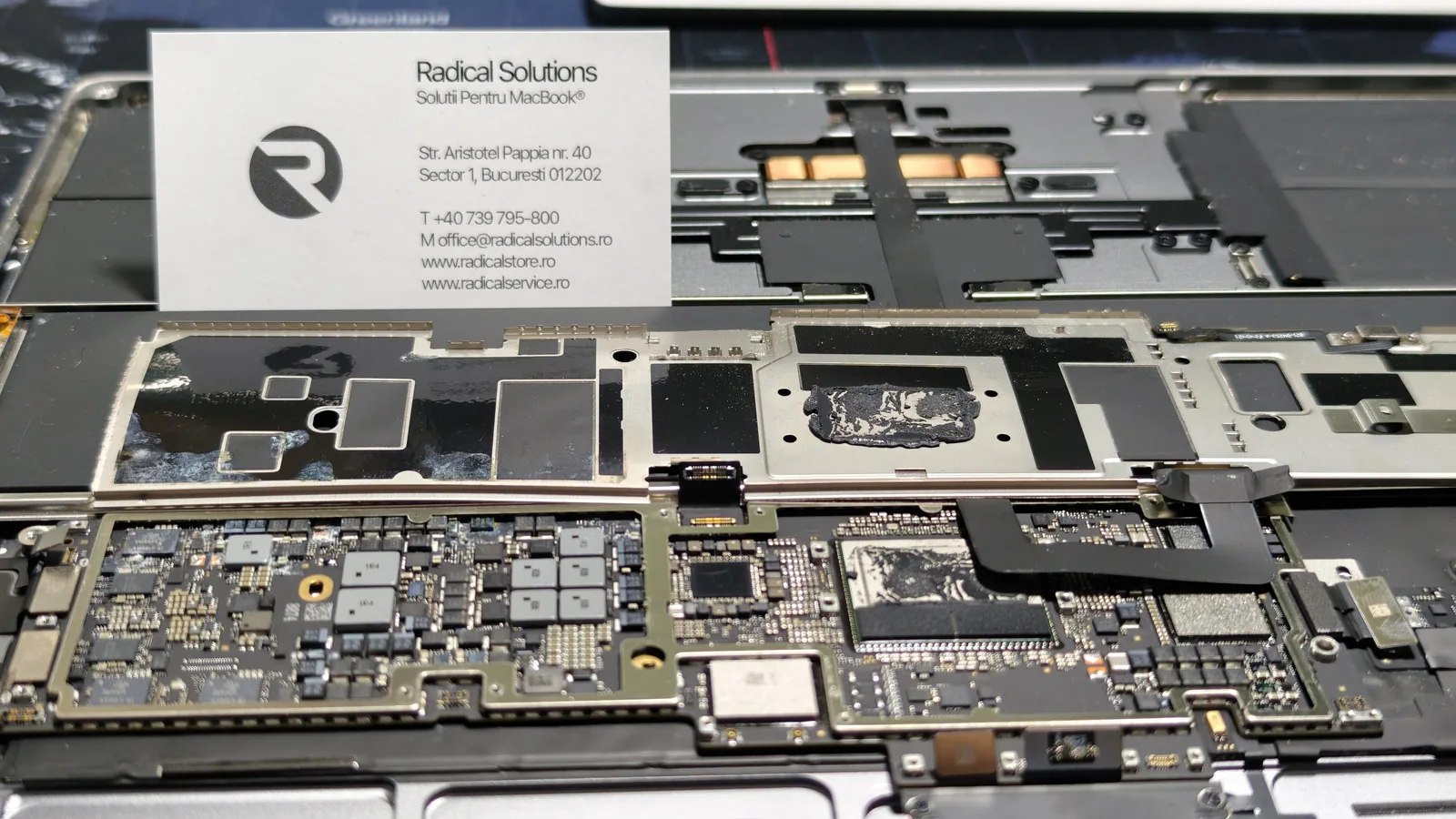
MacBook Air A3114 logic board with extensive corrosion stain under the shield
The dark stain on the shield shows how far the liquid reached before any intervention.

Why liquid is so dangerous (especially with delay)

The problem isn’t the „wetting” itself, but what happens after. On a powered board, water (especially with impurities — sugar, salt, coffee, alcohol) becomes conductive and creates tiny electrical bridges between traces. Electrolysis kicks in: current, moisture and metal react and „eat away” at traces and chip pins. The process continues even with the laptop off, as long as the residue is there.

The classic trap is „it dried and it works”. Yes, it may power on — but the corrosion already started is advancing underneath. One clear technical sign shows at the power input: in cases with a short or abnormal draw, a USB-C power meter reads a tiny, „stuck” current (here, around 0.022 A at 5 V) instead of normal boot behavior — a sign something on the board isn’t right.
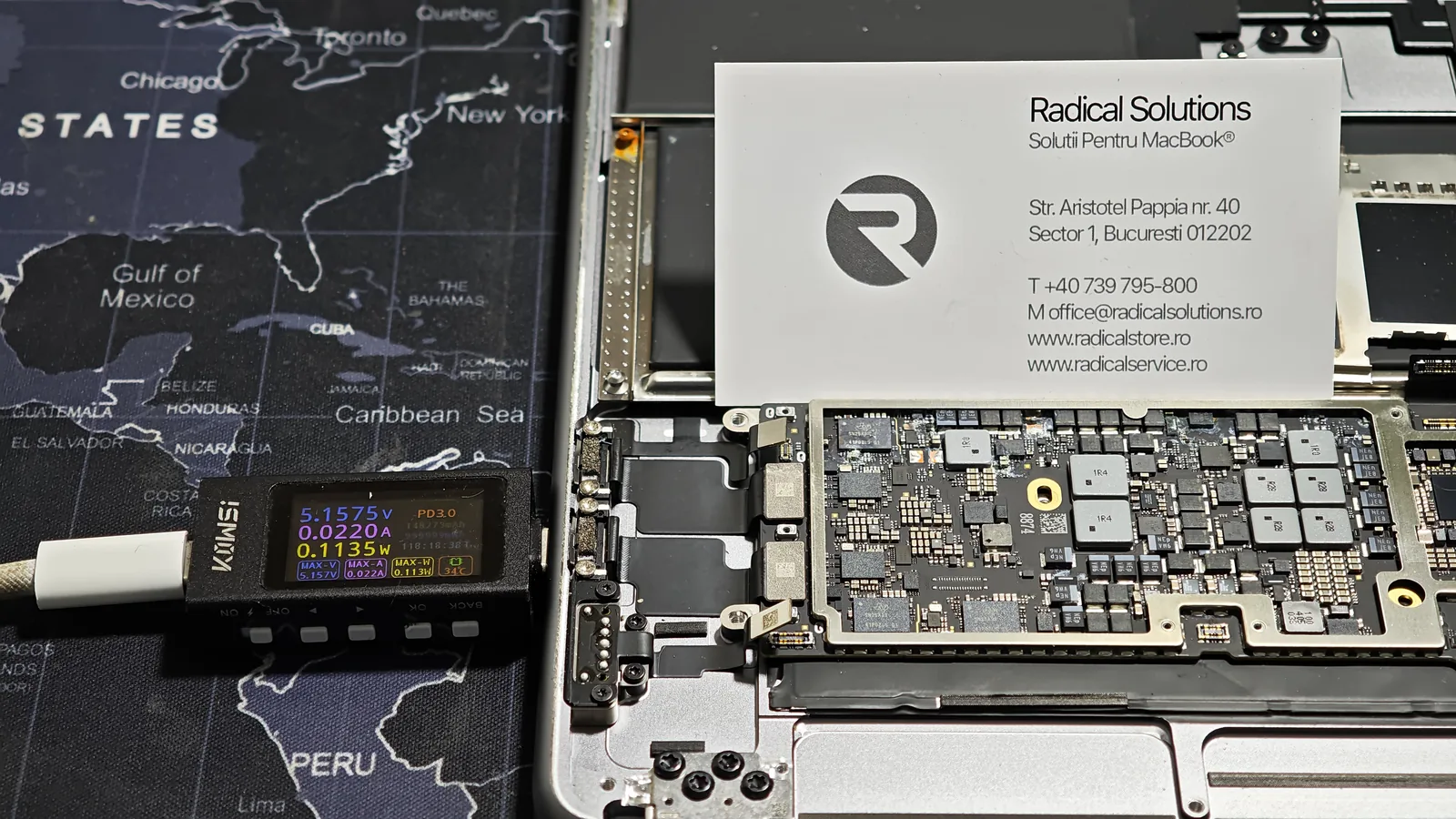
USB-C power meter showing an abnormally low draw on a MacBook with a liquid-damaged board
Abnormal power draw at boot, measured over USB-C — one of the signs of a board in trouble.

What to do in the first minutes after a spill

✅ Shut it down immediately

Hold the power button until it turns off. The less time it spends powered, the less corrosion.

✅ Unplug the charger

Remove the cable and any accessory. Don’t put it on charge „to see if it works”.

✅ Tent it (open, upside down)

Place it keyboard-down in a roof shape, so liquid drains out rather than toward the board.

✅ Bring it in fast

Ideally the same day. Timely professional cleaning is far cheaper than a corroded board.

❌ Don’t power it on or charge it

Current + liquid = accelerated corrosion and short-circuit risk.

❌ No rice, no hairdryer/heat

They don’t stop corrosion and can push moisture deeper or warp components.

The other side: the customer who came in time

To see the difference time makes, here’s the opposite case — a customer who brought the MacBook in quickly after a spill. Here nothing was burned: not the SSD, not the board. Only a professional cleaning was needed, and the price matched — fair, not inflated.

★★★★★ verified Google review
„Highly recommend! They were extremely fast and very serious. I spilled liquid on my MacBook and feared the logic board was affected. Even though they could have said anything (I know nothing about the technical side), they were fair and transparent: they found neither the disk nor the logic board was burned, only a professional cleaning was needed. Everything was solved promptly, with clear explanations, and the price was fair and honest. Thank you for the professionalism!”

— review on Google Reviews

Same cause — liquid on a MacBook — two completely different endings. The one big variable was time: one came quickly and left with a cleaning; the other waited a month and ended up with a board that was no longer worth repairing.

Note: A3114 is the MacBook Air 15" with M3 chip (2024). Prices vary case by case depending on how severe the corrosion is — diagnosis is free, and you get the estimate before any work begins.

5.0 / 5

What our customers say

1127+ verified Google reviews

Find Radical Service faster in Google

Set us as a preferred source: our repair guides and answers get a “preferred” badge in your Google results and AI overviews.

Add as preferred source

Frequently asked questions

I spilled liquid on my MacBook but it still works. Is it fine?

Don’t count on it. Corrosion from liquid keeps going after the device „dries” and seems to work — especially with sugar, salt or alcohol residue. Within days or weeks it can reach a critical trace or chip. Best to shut the MacBook down immediately and bring it in for professional cleaning as soon as possible, even if it powers on.

Does the rice trick work?

No. Rice absorbs a bit of surface moisture at most, but it doesn’t stop corrosion already started on the board and doesn’t clean conductive residue. Meanwhile, many people try to power the laptop on „to see if it works” — exactly what you shouldn’t do. Real cleaning is done disassembled, with solvents and, if needed, an ultrasonic bath.

How much does a liquid-damage repair cost?

It depends hugely on how fast you acted. If you come quickly and only professional cleaning is needed, it’s relatively affordable. If the liquid sat and corroded the logic board, it becomes component-level repair (microsoldering) — in the case in this article, the board estimate was 2,000 lei incl. VAT. Diagnosis is free with us, and you get the price before we start.

What happens if I delay?

It gets worse and more expensive. The example here is clear: a MacBook Air left for a month after a spill came in with extensive board corrosion. The sooner you get to a service, the higher the chance you get away with a simple cleaning instead of a board repair.

Will I lose my data?

Not necessarily. If the SSD and controller aren’t affected, the data stays accessible. If the board is badly corroded, data recovery becomes a separate, more complex job — another reason to act fast. A regular backup (Time Machine or iCloud) remains the best insurance.

What warranty do you offer?

Diagnosis is free and we tell you honestly what can and can’t be repaired. For work we carry out, we provide a written warranty on the invoice. We don’t sell you a pointless repair: if a MacBook isn’t worth saving, we tell you straight.

Spilled something on your MacBook? Don’t wait

Shut it down and bring it in today. Free diagnosis, timely professional cleaning, and board-level repair only if needed — with the price stated up front.

40 Aristotel Pappia Street, Sector 1, Bucharest · Mon–Fri 08:30–17:30