
What happened — in brief
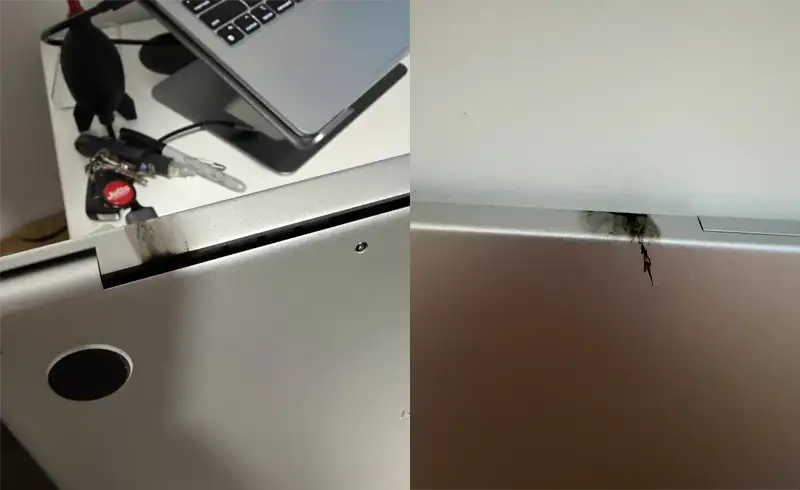
The case was published by Redditor u/ethanmcdonald00 on 3 May 2026 in the r/mac subreddit, titled "I have had this M5 Mac for less than 48 hours and...". On a MacBook Pro M5 with the base config (16 GB unified RAM, 512 GB SSD, ~$1,541 on Amazon US), a spark appeared in the display connector area at an ordinary screen movement — after which the device stopped responding entirely. The wccftech article (Omar Sohail, 3 May 2026) picked up the story and contextualised the incident technically.
Reported case: M5 MacBook Pro dead after 48 hours
On 3 May 2026, Reddit user u/ethanmcdonald00 posted in r/mac photos of a new MacBook Pro M5 (base config — 16 GB RAM, 512 GB SSD) that abruptly stopped working. Just 2 days after purchase.
Cause: spark triggered by hinge movement
According to the description and posted images, the defect appeared at a moment of opening/closing the screen. The hinge movement forced the display connector to touch an area where it shouldn't have, generating a visible spark and an instant short on the logic board. The device wouldn't turn on afterwards.
Technical hypothesis (Louis Rossmann)
Repair technician Louis Rossmann previously observed that Apple has placed higher-voltage power lines next to data lines on the MacBook Pro display connector. With repetitive flex from the hinge, two or more points can come into contact, resulting in a short circuit. The wccftech article ties this historical observation to the current case as a plausible explanation.
Apple — no official comments (yet)
At the time the wccftech article was published, Apple hadn't confirmed a manufacturing defect, hadn't announced a service programme, and hadn't issued a recall. Wccftech contacted the company for clarification — no public reply yet.
The technical hypothesis — why a spark is plausible
On modern MacBook Pro, the display connector (the flex cable passing through the hinge) carries simultaneously video data lines (LVDS / eDP), control lines (ambient light, camera, microphone) and power lines (backlight, panel power, T-Con). Pin density is very high and the metal pads are extremely close together.
Louis Rossmann's observation — repeated in multiple YouTube videos on his channel — is that on recent generations Apple has placed higher-power lines right next to data lines. Under repetitive flex (daily screen open/close), a cable or component can end up touching a nearby pad area carrying higher voltage. Result: instant short circuit, visible as a spark, that burns sensitive transistors or capacitors on the board.
Important: Rossmann hasn't confirmed this specific mechanism for the M5 case — wccftech only links his earlier observation to the current case as a possible explanation. Apple hasn't confirmed nor denied.
Potentially affected models
- MacBook Pro 14" M5 (2026)
- MacBook Pro 16" M5 (2026)
Appearance on M3 or M4 hasn't been publicly reported in connection with this mechanism. The display connector design varies between generations, so generalising isn't justified at the moment.
Early signs — what to watch for
If you have a MacBook Pro M5 and want to be proactive, watch these signals. None guarantees you'll experience the incident, but any of them justifies a visit to an Apple Authorised Service Provider before the board burns:
Flicker or stripes on the screen at open/close
If you see flashes, horizontal stripes or dead pixels that appear/disappear depending on the screen's opening angle, it's a signal the display flex is already stressed. DO NOT force the close — that's exactly the movement that can trigger the short circuit.
Click or noise from the hinge area
A metallic click or a small "crack" on opening indicates stressed plastic or trapped cables. On Apple Silicon models this area is very tight, with no tolerance. Any anomaly here justifies a service check.
Intermittent picture on internal screen, external OK
If the internal screen has issues (black, flickering) but an external display connected via USB-C works perfectly, the problem is exclusively on the internal display ↔ board line, exactly where it passes through the hinge.
Feeling of "warmth" in the hinge area
A high temperature in the hinge area, when the device sits at rest or under light load, can indicate a parasitic conductive path dissipating current — the prelude to a full short circuit.
What to do if you're affected (step by step)
The MacBook Pro M5 is still under Apple warranty for anyone who bought it in 2025–2026. The correct steps:
Shut down the MacBook and DO NOT move the screen
Long-press Power until it shuts off. If you suspect a hinge / display flex issue, every additional open/close raises the risk. Leave it open in the position it's in and stop moving the lid.
Document everything — photos, video, time, context
Take photos of the visible defect (spark, burn marks, black screen, on-screen messages before shutdown). Note exactly when it started, what you were doing, whether the charger was plugged in, whether there was any impact. All this helps your conversation with Apple.
Call Apple Support or go to an Apple Authorised Service Provider
For an M5 MacBook bought weeks/months ago, you're 100% under Apple warranty (1 year minimum, or 2 years if bought in the EU). A manufacturing defect must be treated free. In Romania, Apple Authorised Service Providers are the official Apple channel for warranty: iServ, iStyle, Quick Mobile.
Ask for replacement, not just repair
On a device defective in the first days/weeks, ask for replacement, not repair with a new board. Your consumer rights in the EU include the possibility of replacement in cases of significant defects appearing early. Apple typically accepts replacement in the first 14 days without discussion and often up to 90 days with technical / medical documentation.
If Apple refuses or warranty has expired — call us
In rare cases, Apple may refuse on grounds of "liquid" (false positive from LCI indicator) or non-existent "mechanical damage". If you face an unjustified refusal, we can prepare an independent technical report that helps your complaint. For out-of-warranty devices (after 2–3 years), we repair the board at component level — we restore the display connector, replace burnt chips.
When we come into play
For a recently bought M5 MacBook, the first option is always Apple — free, official, with replacement. We're relevant in two scenarios:
- Apple refuses warranty on controversial grounds (false-positive LCI, non-existent "mechanical damage"). We can prepare an independent technical report supporting your claim — microscope photos of the board, technical explanation of the defect, electrical trace.
- Warranty has expired or you bought second-hand without invoice. We repair at component level on the board — restore the display connector, replace chips burnt by the short circuit, keep the board and SSD (your data stays). Free diagnostic, written quote.
✓ Component-level repair — we keep the board, keep the SSD, keep the data.
✓ Exact price on your model — see the price list or call us at +40 739 795 800.
✓ For M5 under warranty: we recommend Apple Authorised Service Provider first, it's free for you.
Frequently asked questions
Is it an isolated case or a problem with the entire M5 range?
Are M3/M4 models affected too?
Will Apple give me a new MacBook or just repair the board?
Should I buy AppleCare+ on the M5 after this news?
Can I do anything preventive to avoid the defect?
What if the MacBook turns on but the internal screen is dead?
How much does the repair cost if the warranty has expired?
Is my data lost?
Sources
- Wccftech — M5 MacBook Pro Hinge Movement Causes Spark, Resulting In Catastrophic Failure Just Two Days After Purchase (Omar Sohail, 3 May 2026)
- Reddit r/mac — original post by user ethanmcdonald00
- Louis Rossmann — historical observations on his YouTube channel about the positioning of power lines on the MacBook display connector