
The 4 symptoms — recognise yours
Before any diagnosis, identify what you actually see. The symptom is what differentiates repair from replacement. Here is the typical picture on iPhone 13 series:
Constant green tint — the screen has a permanent green cast
Everything on screen takes on a uniform green layer (most visible on white or light grey areas). It looks like "the red is missing" from the image. Appears immediately on boot, present in every app. This is the most common symptom on iPhone 13 Pro / Pro Max, and the best candidate for repair at 360 RON.
Green flicker — green that appears and disappears
The green tint is not permanent — it shows in short pulses, mostly at low brightness (under 30-40%). It is tied to how the OLED performs Pulse-Width Modulation (PWM) for brightness control. Often appears while holding the phone and disappears when plugged into a charger. Repairable in most cases.
Yellow tint or yellow patches
Less common but real: certain zones of the screen (usually an edge or a patch) take a yellowish cast on white background. Indicates a weak connection on the panel driver side. Repairable if there are no OLED microcracks in that zone.
Vertical or horizontal lines on the screen
Thin green, red or unidentified colour lines crossing the screen. May appear after an impact or spontaneously after 6-12 months of use. Clear indicator of a problem on the display-to-board flex line. In 70-80% of these cases repair without display swap is possible.
First try software fixes (4 steps, 5 minutes)
Before heading to service, run through the 4 checks below. If any of them RESOLVES the problem, it is clearly software and you have saved yourself the trip:
Raise brightness above 50%
Settings → Display & Brightness → move the slider above the middle. On OLED, PWM (Pulse-Width Modulation) causes flicker at low brightness. If the green disappears at high brightness, the problem is probably PWM-related, not permanent hardware.
Turn off Auto-Brightness
Settings → Accessibility → Display & Text Size → toggle off "Auto-Brightness". This prevents the phone from automatically dropping brightness below the critical threshold.
Disable True Tone and Night Shift temporarily
Settings → Display & Brightness → toggle off True Tone + Night Shift. These features auto-adjust colour balance; sometimes they get "stuck" on a bad setting that amplifies the green tint.
Simple restart, then DFU if it persists
Regular restart: turn off for 30 seconds, restart. If green persists, try an iOS reinstall via Finder/iTunes in Recovery Mode (no data wipe). If even that does not fix it, the issue is clearly hardware.
Why 90% of cases are REPAIRABLE — the real technical causes
iPhone 13 series uses a Super Retina XDR OLED, powered through a thin flex connected to the logic board by a ZIF connector. Green, yellow or flicker on screen almost always points to a problem along this path, NOT on the OLED panel itself. Here are the 4 frequent technical causes:
Weak display connector on the logic board
The most common cause. The ZIF (zero insertion force) connector between the display flex and the logic board loses perfect contact after hundreds of heating/cooling cycles inside the case. Repair: clean contacts with isopropyl, reseat the connector, re-solder if needed. Under 1 hour for an experienced technician.
Display flex bent or with micro-fractures
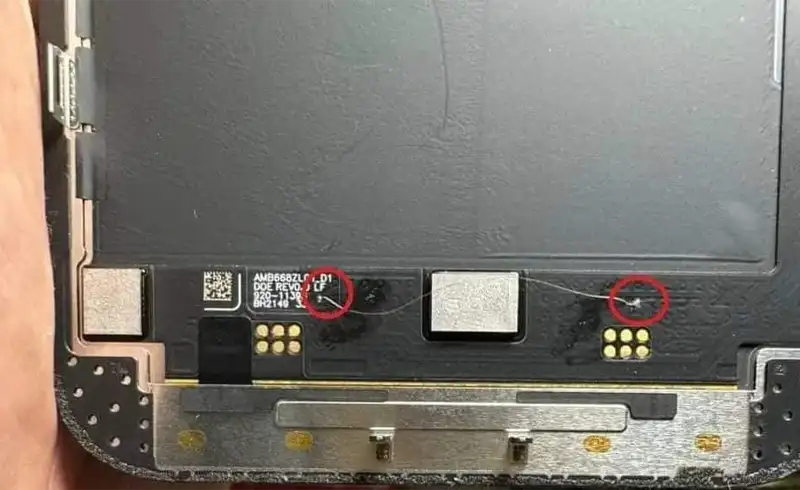
The thin cable (under 0.3 mm) carrying signal from the board to the OLED bends dozens of times in the phone life (every service open, mount-dismount, impact). Microfractures on copper traces cause loss-of-signal on individual R/G/B channels — hence the green dominance. Repair: re-soldering points on the flex.
Burnt capacitor or resistor on the display power line
Rarer: a small electrical component (filter capacitor or protection resistor) on the VDD/VCI line powering the OLED gives up after years of use. Replacing it with an equivalent component (parts cost under 1 RON) restores full power. Diagnosed with microscope and thermal imaging.
OLED driver IC — at the limit
On iPhone 13 series, the OLED driver IC sits on the display board (not on the main board). If it has thermal damage, controlled hot air reflow can bring it back to life in 60-70% of cases. If fully burnt out, then it is the 10% irrecoverable case — display swap required.
What we actually do in a 360 RON repair
The repair is not magic, it is a standard technical procedure. In short:
- Open the phone — controlled heating for the back glass or display lift depending on the case, following iPhone 13 sealing properties;
- Microscope diagnosis — inspect the display connector, the flex on both ends, the OLED power-management area on the logic board, the integrity of solder pads;
- The repair procedure, based on the diagnosis:
- Clean contacts and reseat the connector (15-30 min);
- Microsoldering on the flex if microfractures exist (45-90 min);
- Controlled hot air reflow on the driver IC (30-60 min);
- Replace burnt capacitors/resistors on the VDD/VCI line (30-45 min).
- Full test — boot, screen test at varying brightness levels, True Tone, Night Shift, Touch ID, all functions;
- Reassembly with new sealing — we preserve water/dust resistance as much as possible, though the official IP68 spec is no longer guaranteed after any intervention.
Total: 1-3 hours of labour, 360 RON inclusive of VAT, 3-month warranty. Your original display stays in the iPhone — we do not swap it.
The 10% case — when repair is NOT possible
Full honesty: in 1 case out of 10, the problem is NOT on the board but on the OLED panel itself. The signs:
OLED glass microcracks, visible only under microscope
After an impact that did not visibly crack the screen, the OLED panel may have micron-order cracks (0.01-0.05 mm) in the polariser layer or on the TFT drivers. Invisible to the naked eye, visible only at 40x magnification. Cause irreversible colour degradation. Cannot be "repaired" — only solution is panel swap.
Black spots that grow over time
If you have a black or dark spot growing visibly from one week to the next, that is physical OLED burn-in (not software). Irreparable — the organic pixel molecule has permanently degraded. Display swap mandatory.
Permanent ghost image (severe image retention)
You can still faintly see the outline of home screen icons even after changing the wallpaper, for minutes. That is no longer a software fix — it is OLED degradation. Connector repair will not help, the physical panel is worn out.
In these cases, a display swap remains the only solution. At our shop, an iPhone 13 / 13 Pro / 13 Pro Max display swap with a Refurbished part starts at 700-1200 RON (see price list). The diagnosis tells you CLEARLY whether you are in the 90% or the 10% case, before we proceed.
Why other shops always say "swap the display"
Two simple reasons, no conspiracy theories:
- Component-level repair requires expertise and equipment — 40x stereo microscope, controlled hot air station, silver microsoldering, years of practice. Many shops do not have it and default to swap (a simpler mechanical operation).
- Margin is higher on swap than on repair — a Refurbished display bought at 350-500 RON, sold at 800-1200, with 30 min labour. Clear profit. Component-level repair: 1-3 hours of labour, parts under 5 RON in materials, final price 360 RON. Lower margin, but technically correct reality for the client.
This does not mean every shop saying "swap" is dishonest — on models where repair really is impossible (or inefficient), swap is the right answer. But on iPhone 13 series with green screen / flicker / yellow, automatic swap is a commercial decision, not a technical one.