
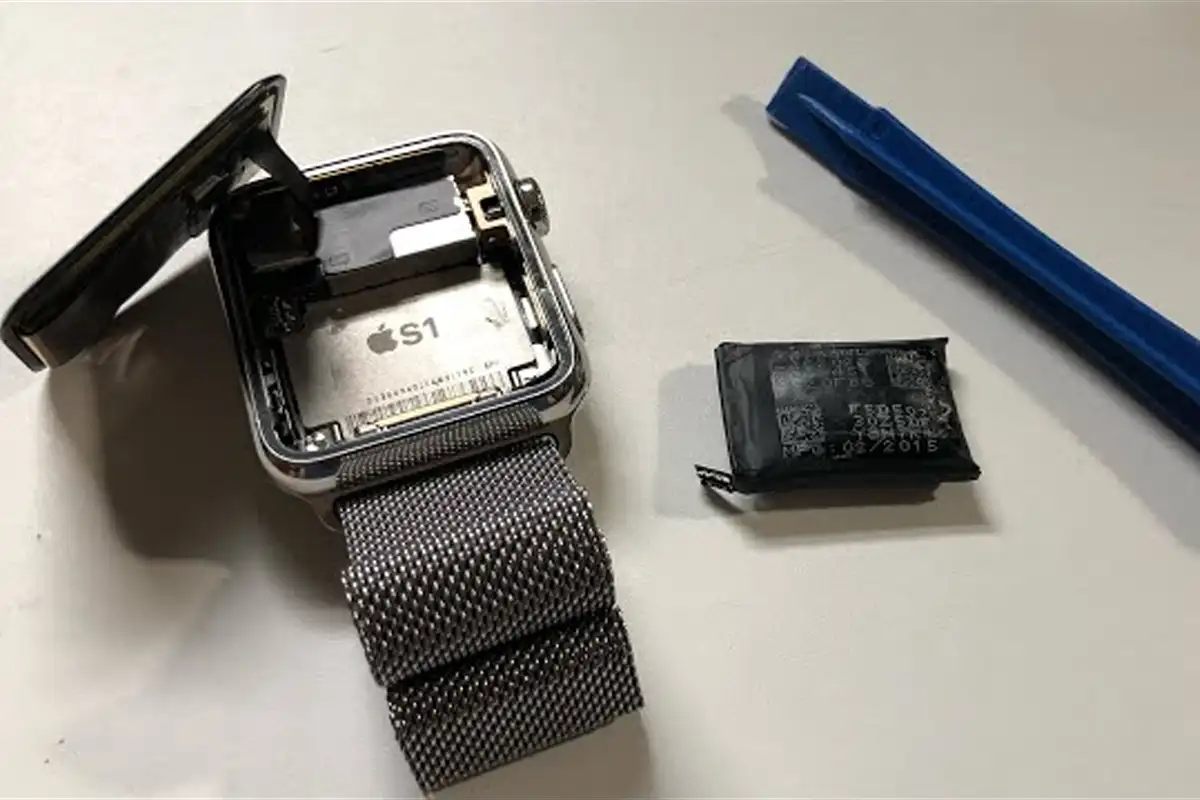
What battery swelling is, and why it happens
The lithium-polymer (Li-Po) batteries used in Apple Watch are built from thin cells wrapped in a laminated aluminium sheet. Inside, a liquid electrolyte allows ions to move between the anode and cathode during charge/discharge. After a few hundred full cycles, the internal chemistry degrades — the by-products (CO₂, ethylene, hydrogen) can no longer be reabsorbed and accumulate as gas inside the cell.
The gas pushes the aluminium wrapper to expand. On devices with internal headroom (laptops, iPads), the expansion is initially invisible from outside. On Apple Watch — a device with millimetre-tight tolerances — the expansion pushes directly on the screen, the only flexible element. The visible result: the screen lifts out of the aluminium bezel, leaving a visible gap around the perimeter.
The 5 symptoms — in order of appearance
Battery swelling is a progressive phenomenon. It starts with subtle signs and escalates over weeks. If you recognise yourself in any of the situations below, head to diagnostic:
The screen has lifted — visible or imperceptible
The clearest sign. The screen is no longer perfectly flush with the case — there's a visible gap on the edges (especially on the right side), sometimes the screen "flexes" when pressed. In advanced cases, the screen is literally lifted 1–3 mm above the metal bezel. Do NOT force it back — you risk tearing the display flex or puncturing the battery.
Touch no longer responds precisely in certain areas
If the screen is partially separated from the digitiser, taps are registered with an offset (you press one button and a different one is selected), or some areas don't respond at all. Apple Watch starts making "ghost touches" — unintended presses caused by the battery pushing the screen from underneath.
Battery drains noticeably faster
Used to last 1.5–2 days, now barely makes it through 8–12 hours. A swollen battery is one with degraded chemistry — the actual capacity is a fraction of the original. Check in the Watch app → General → About → cycle count number.
Watch shuts down unexpectedly or restarts
Under load (workout, training, GPS active) or in cold weather — the Apple Watch shuts down abruptly even though it shows 30–50% battery. This indicates a swollen battery that can no longer deliver stable current on demand.
The back is coming off or shifting
Rarer but serious. The back case (heart sensor) partially separates from the rest of the watch body. Apple's adhesive is very strong — if it gives way, the internal pressure from the battery is very high. URGENT action needed here.
Affected series — risk by generation
Not all Apple Watch models are equal when it comes to battery swelling. Apple has made improvements over time — but the problem remains real on older models. Here\'s the breakdown by generation:
| Generation | Risk | Note |
|---|---|---|
| Apple Watch Series 0, 1, 2, 3 | VERY HIGH | Thin battery and case design — the most common occurrences, especially after 4+ years. |
| Apple Watch Series 4, 5, 6 | HIGH | Series 5+ added a metal shield above the battery, but it doesn't fully eliminate the risk. Frequently seen after 5–6 years of use. |
| Apple Watch SE (gen 1, gen 2) | MEDIUM | Same battery as Series 5–6, so the same long-term issues. SE2 is too new for a significant volume of reported cases. |
| Apple Watch Series 7, 8, 9 | LOW–MEDIUM | Apple improved battery chemistry and sealing. Cases reported but rarer. Appears after 5–7 years or under extreme use. |
| Apple Watch Series 10, 11, Ultra | LOW | Too new for significant reports. Ultra has a larger battery, but in a thicker case with more headroom — the "popping" risk is theoretically lower. |
How to check at home — 5 simple steps
Before heading to service, do a quick check to confirm it\'s battery swelling and not something else. 5 minutes, no special tools:
Visual check around the screen bezel
Look at the Apple Watch from the side under good light. Check the perimeter of the screen — it should be perfectly flush with the metal case. Any visible gap, even 0.5 mm, is a sign of a developing swollen battery.
Fingernail or plastic card test
Gently run your fingernail (NOT a sharp object) along the edge of the screen. If it catches anywhere, the screen is no longer flush with the case. For a more precise test, try to insert the corner of a plastic card — if it goes in even partially, the battery is swollen.
Functional touch test
Open an app with small buttons (Mail, Settings) and try to press each one with precision. If you see that taps are registered with offset or miss the targets, the screen is likely no longer perfectly aligned due to swelling.
Check battery cycle count
On your iPhone, open the Watch app → General → About → scroll down. Look for "Battery Cycle Count" and "Battery Maximum Capacity". If "Maximum Capacity" is under 80% or cycle count over 500 and you have physical signs, everything points to a battery at end of life.
Stop using and head to service
If any of the signs above are confirmed, do NOT use the Apple Watch for sports activities (especially not underwater) and head to service. A swollen battery is a progressive issue — it gets worse within weeks.
Why you can\'t ignore it — 4 real risks
The temptation to "wait another month until I find time" is strong. But here\'s what can go wrong:
Fire or explosion
Lithium-polymer batteries can enter "thermal runaway" — a chain chemical reaction that triggers ignition. A swollen battery is already under internal pressure; a mechanical impact, overcharge, or heat exposure can be enough to set it off.
Electrolyte leakage
If the battery ruptures, the electrolyte (fluorides and organic solvents) leaks out. It's corrosive to your skin, destroys electronic components and has a pungent smell. On skin contact — rinse abundantly with water and consult a doctor.
Damage to screen and internal components
As the battery swells, it lifts the screen. The display flex (the thin cable that connects the screen to the board) stretches and can tear — adding 500–1500 RON for a refurbished display. With advanced swelling, the rear heart sensor can also be damaged.
Risk of making the repair worse by continued use
If you keep using the Apple Watch with a swollen battery, the pressure can damage the battery connector or the logic board. A 400–700 RON repair (battery only) becomes 1500–2500 RON (battery + display + possibly board).
Apple\'s 3-year program — free for the eligible
Apple acknowledges that battery swelling is a known issue and offers free replacement for any Apple Watch:
- Under 3 years from the purchase date — verifiable on Apple\'s site with your serial number;
- Battery swelled under normal use — no signs of mechanical damage or liquid;
- At any Apple Store or Apple Authorised Service Provider — in Romania: iServ, iStyle, Quick Mobile.
Eligibility check: go to checkcoverage.apple.com, enter your serial (in the Watch app → General → About → Serial Number). If the result shows "covered" for hardware, it\'s free. Caveat: Apple sometimes charges an extra fee (up to $209 according to international reports) if the swollen battery has also damaged the screen — escalate to the Apple Store manager if you run into that.
What we do in this context
The clear strategy: if you\'re within Apple\'s 3-year coverage, we send you to AASP — it\'s free for you. We\'re relevant for those out-of-warranty and complicated cases:
✓ OEM battery replacement — Series 4–6 / SE1: 400 RON · Series 7–9 / SE2: 500 RON · Series 10: 600 RON · Series 11 / Ultra gen 1: 700 RON · Ultra gen 2: 900 RON · Ultra gen 3: 1200 RON. See the full per-model list.
✓ New water-resistant sealing — tested after the repair before you get the watch back.
✓ Display + battery bundle — if the battery has also damaged the screen, there\'s a discount on the package.
✓ 3-month warranty on battery and workmanship.
Warning: do NOT try to fix it yourself
Apple Watch is one of the hardest devices to disassemble in the Apple ecosystem. DIY risks:
- Tearing the display flex — a thin 0.3 mm cable connecting the screen to the board. The slightest tug breaks it, replacement 500–1500 RON;
- Damaging the Force Touch sensor (on Series 0–3) — a conductive layer bonded to the screen, irreparable if torn;
- Puncturing the swollen battery during disassembly — real fire risk, especially on degraded batteries;
- Loss of water resistance — Apple\'s sealing is calibrated industrially, can\'t be redone at home. Your Watch is no longer safe in the shower or pool.
Professional repair requires controlled heating equipment, suction cups of the exact size, opening picks made from soft materials, and patience. The 400–1200 RON investment at our shop is insurance against a Watch destroyed at 2000–3500 RON.