Maintenance MacBook Pro 16" A2485 Real workshop case 5 min read Preferred source in Google

This is what a MacBook Pro 16 that needs cleaning looks like

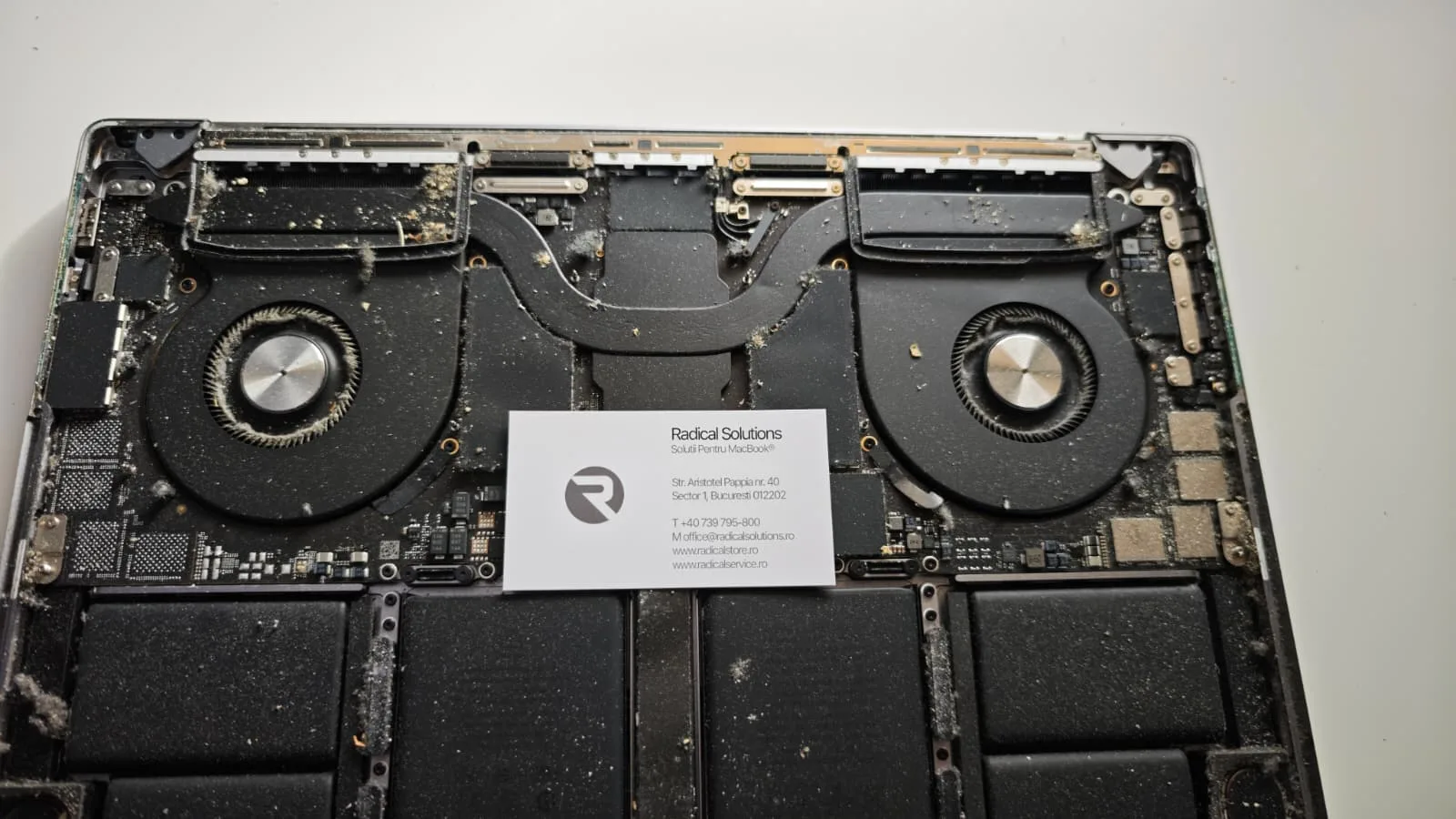
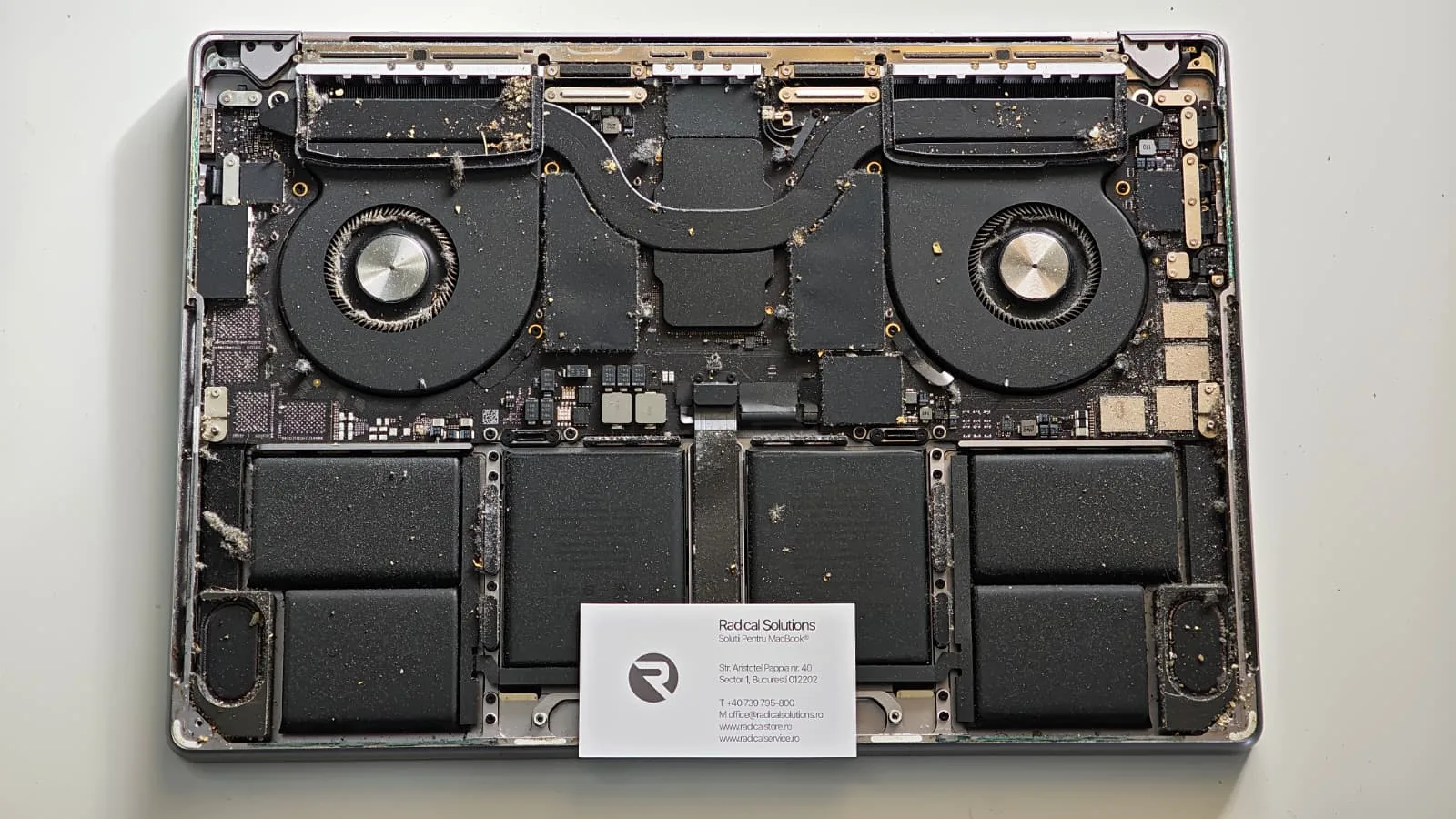
A 16" MacBook Pro, model A2485, came in for cleaning. From the outside it looked fine. When we opened it: lint caught between the fan blades, clogged heatsinks, crumbs and dust over the battery, board and speakers. Here’s what it looks like, what dust does and why a timely clean is worth it.

Alin Marin: CEO, Radical Service
CEO, Radical Service
MacBook Pro 16 A2485 opened in our workshop MacBook Pro 16 A2485 opened in the workshop: fans, heatsinks, board and battery covered in dust and lint
MacBook Pro 16" A2485 opened in our workshop, with dust and lint from the fans to the speakers.

A2485

MacBook Pro 16", Apple Silicon

2

fans full of lint

1-2 years

recommended cleaning interval

-21%

on labour, 11-30 November

The fans and heatsinks

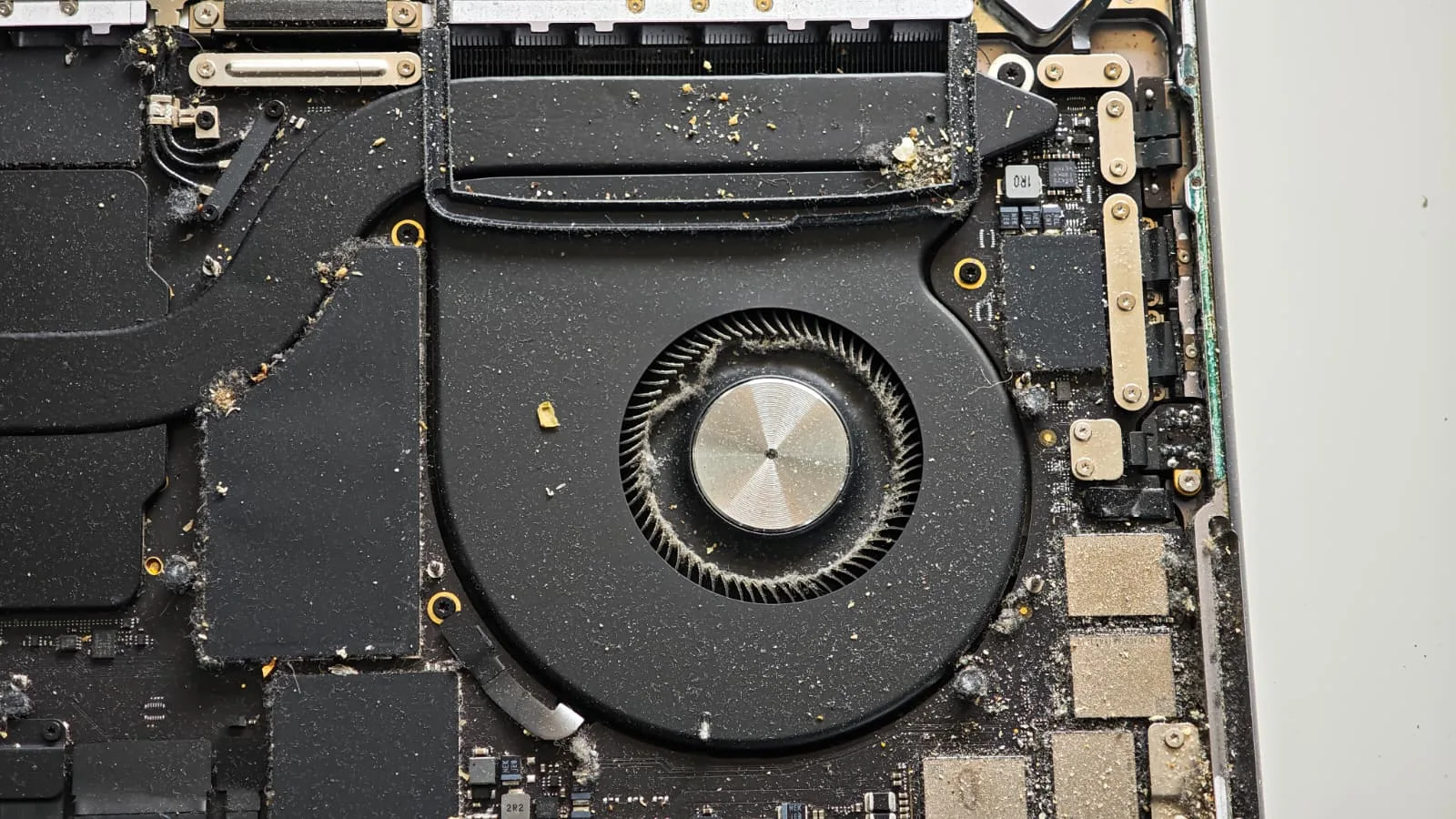
This is where it shows most clearly. Rings of lint have formed between the blades of both fans, and clumps of dust and even crumbs sit at the heatsink inlets. The heatsink is how the laptop gets rid of heat. When its fins are covered, air no longer flows and the heat stays inside.
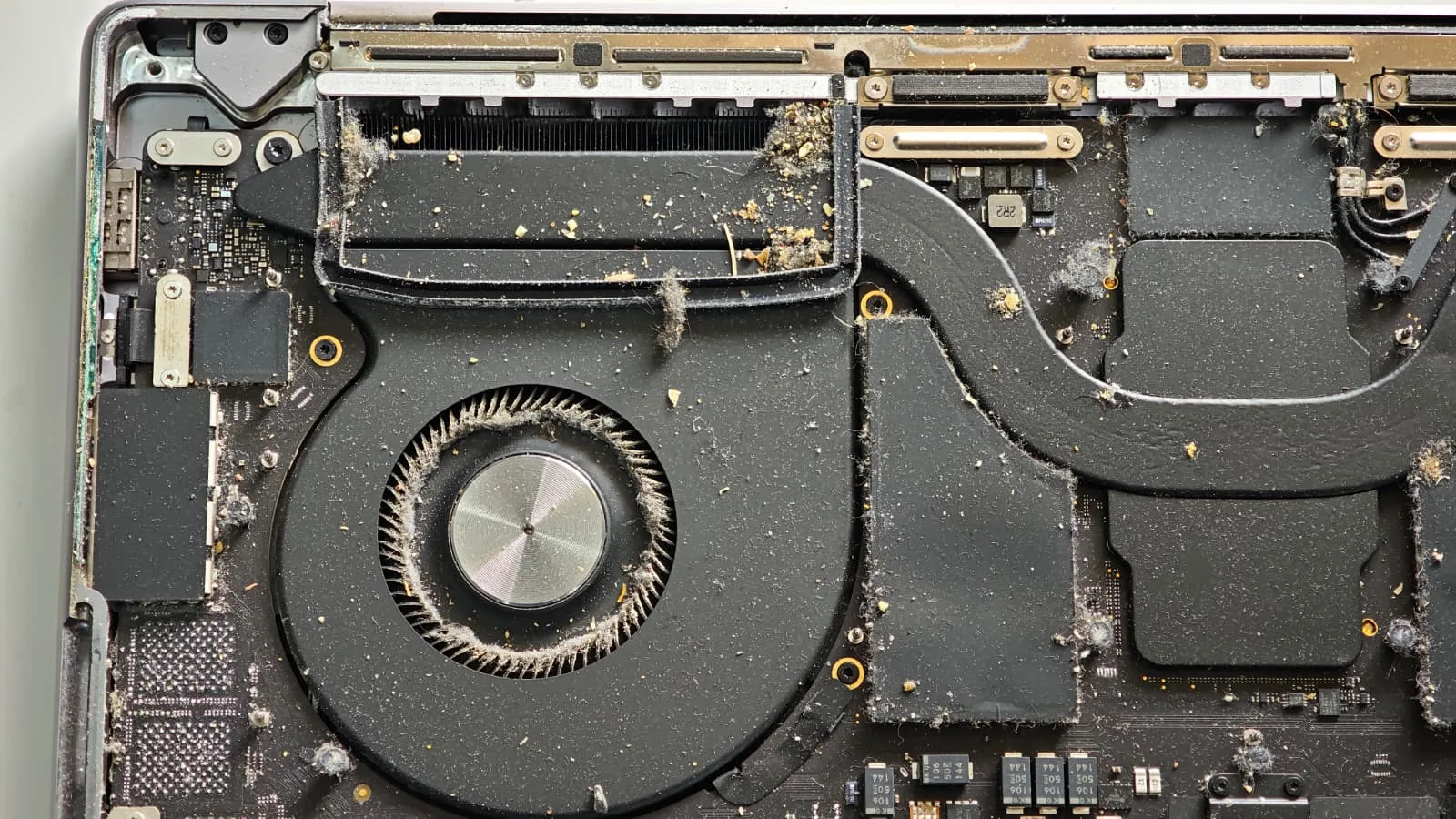
Left fan MacBook Pro 16 A2485 left fan with lint between the blades and a dusty heatsink
A ring of lint between the blades and dust at the heatsink inlet.
Right fan MacBook Pro 16 A2485 right fan with lint and dust
The same picture on the right fan.
Fans and heatsinks Top section of the MacBook Pro 16 A2485: both fans, the heatsinks and the heat pipe covered in dust
Both fans, the heatsinks and the heat pipe between them.

The battery, board and speakers

Dust doesn’t stay in the fans. It settles on the battery cells, on the board components and around the speakers, and lint builds up along the edges. On the board, dust holds moisture and over time can lead to corrosion and short circuits, as happened in the case of a MacBook Pro 16 A2141 with a burnt SSD.
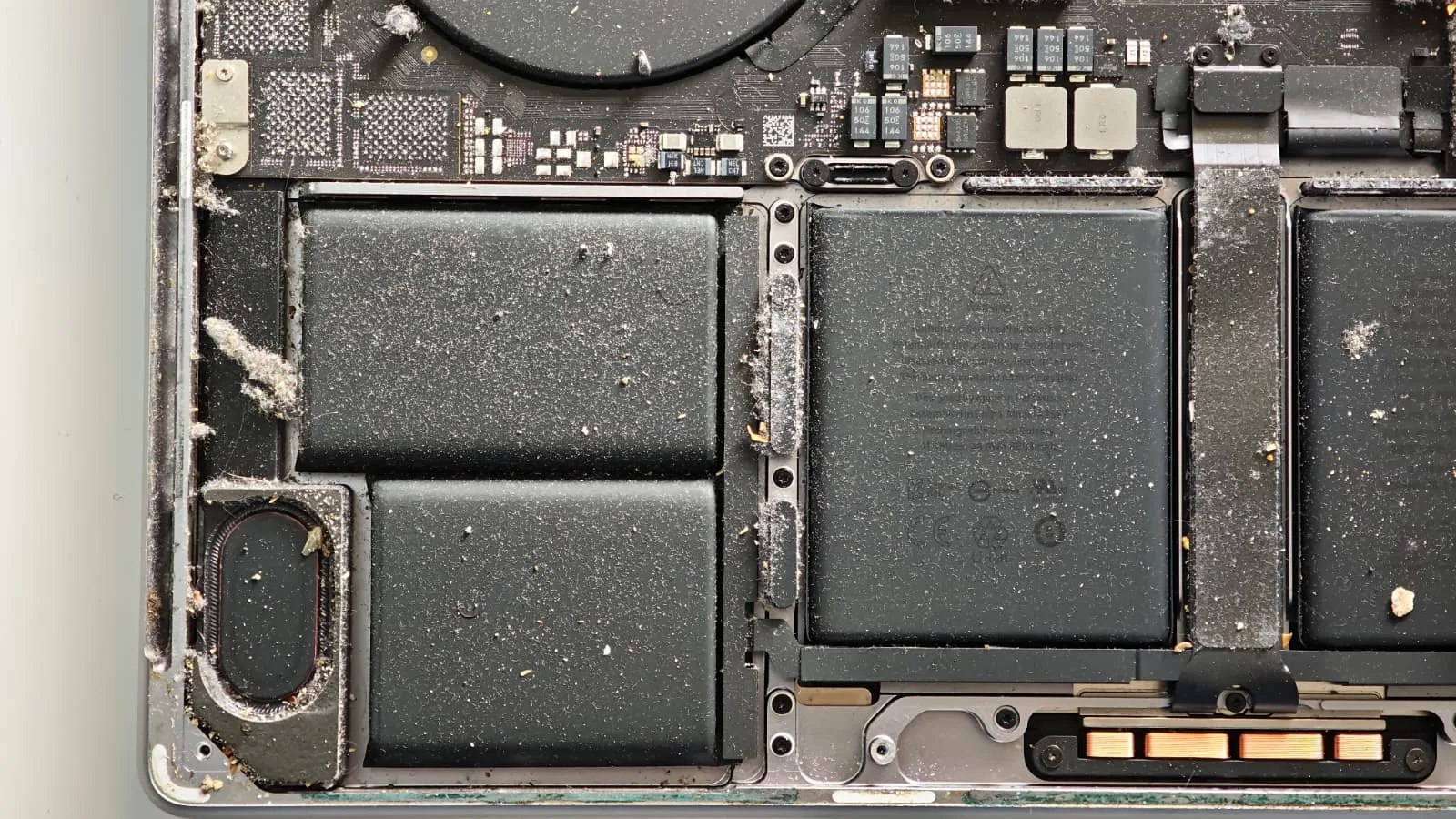
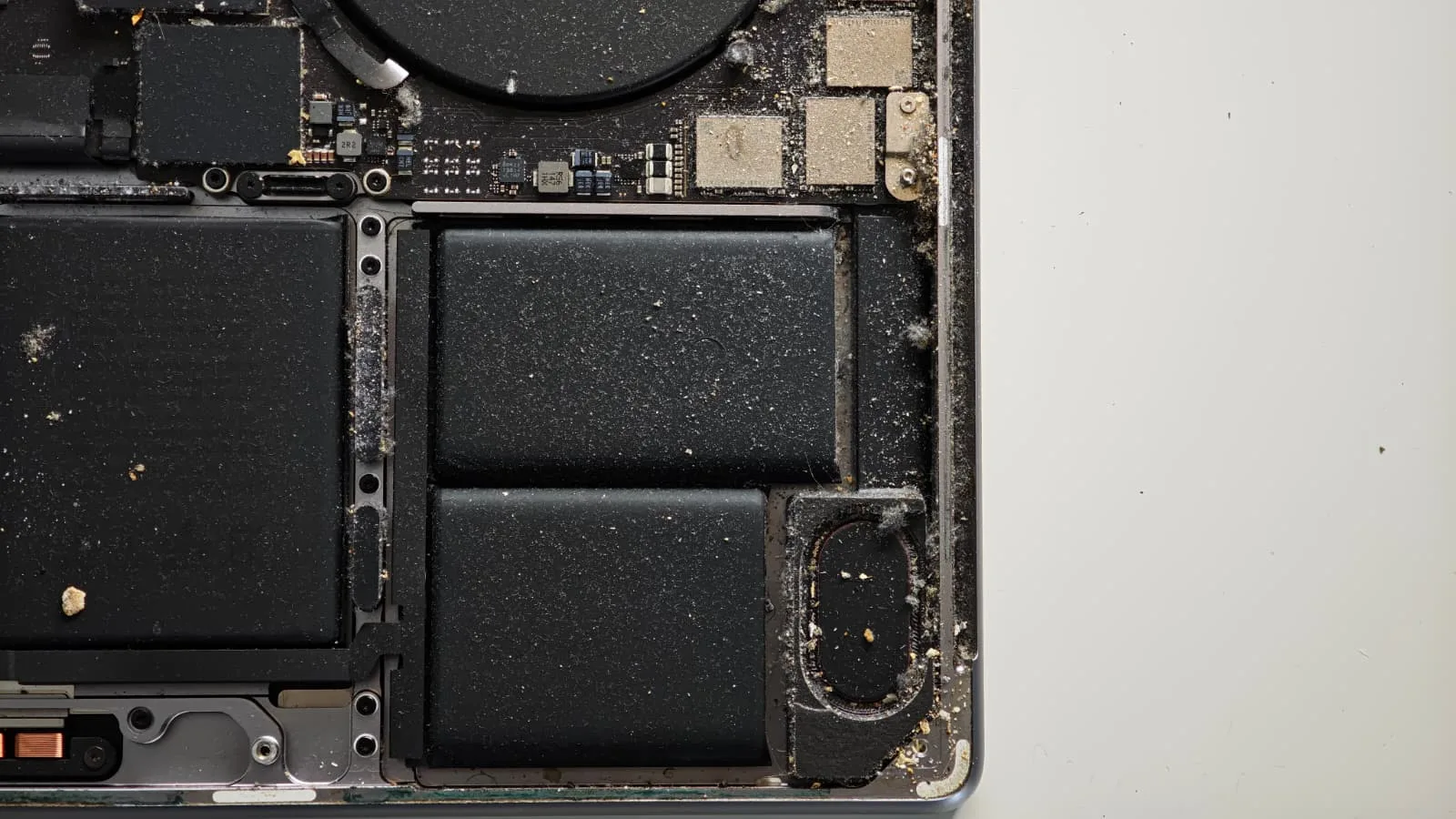
Battery and speaker, left MacBook Pro 16 A2485 battery cells and left speaker covered in dust
Dust on the battery cells and lint around the speaker.
Battery and speaker, right MacBook Pro 16 A2485 battery cells and right speaker with dust and crumbs
The right side has dust, lint and crumbs too.

What dust does to a MacBook Pro

Higher temperatures

With clogged heatsinks, heat can’t escape. The laptop gets hotter faster, and the fans kick in more and more often.

Reduced performance

To protect itself, the processor lowers its clock speed when it overheats. During renders, exports or builds, you feel the difference.

Long-term risk

Constant heat ages the battery faster, and dust on the board holds moisture and can lead to corrosion.

How we clean

We open the case and disconnect the battery before anything else. We clean the fans and heatsink fins, remove dust and lint from the board, battery and speakers, then check the connectors and test the laptop at the end. No compressed air blown through the vents, which only pushes dust deeper.

Offer 11-30 November 2026

21% off labour, cleaning included

Until 30 November, we’re essentially waiving the VAT on labour: 21% off with the code discountTVA, for labour on any fitted part or for cleaning. The offer doesn’t apply to logic board repairs.

See the offer (in Romanian)

Find Radical Service faster in Google

Set us as a preferred source: our repair guides and answers get a “preferred” badge in your Google results and AI overviews.

Add as preferred source
5.0 / 5

What our customers say

1200+ verified Google reviews

"

Reparație Placa de Bază MacBook Air. Foarte mulțumit.

Solacolu Gheorghe

Solacolu Gheorghe

în ultima săptămână

"

Ca de obicei, o experienta excelenta cu toate produsele Apple pe care le-am adus la ei. In cazul de fata, instalarea unei baterii noi pentru iPhone 15 ProMax a durat 20 de minute, iar bateria instalata functioneaza ca si cum telefonul ar fi nou. Cu siguranta voi reveni pentru orice probleme cu produsele mele Apple!

Andrei Manda

Andrei Manda

în ultima săptămână

"

Recomand. Personal amabil, servicii rapide. Mi-au reparat ipadul in 3 ore.

Bianca Radu

Bianca Radu

în ultima săptămână

"

Absolut nimic de reprosat de la customer support pana la modul de lucru pe device-uri in sine. Am dus la ei un Macbook Pro de 16inch cu display-ul spart. Nu se observa nici cea mai mica urma de interventie! Toate dispozitivele mele Apple vor ajunge la ei pe viitor!

Andrei Păduraru

Andrei Păduraru

în ultima săptămână

"

O experienta foarte placuta. Recomand.

Cristian Aroșculesei

Cristian Aroșculesei

în ultima săptămână

"

Am apelat la acest service datorita recenziilor bune. Mi-a fost spus ca o sa mi se schimbe tastatura plus backlight in urma unui contact cu coca cola. In urma reparatiei am primit laptop-ul cu tasta de langa shift care nu se aprinde si tastatura care nu se apasa bine (tastele fac doua click-uri, si feedback-ul tastelor nu este unul bun, sunt instabile). Aceste lucruri nu mi-au fost comunicate inainte sa trimit laptop-ul. Am incercat sa contactez firma sa vina cu explicatii, si mi s-a spus ca tastatura nu mai este lipita ca cea originala si este prinsa in suruburi. Iar punctul interesant a fost ca mi s-a spus ca ei “nu vad problema” la tasta tilda care nu se aprinde din cauza backlight-ului. Si mi-au oferit varianta sa inlocuiasca topcase-ul cu totul la un pret mai mic, lucru care dupa parerea mea trebuia mentionat de la inceput. As fi putut macar incerca o curatare a tastaturii originale daca stiam. Sau macar sa isi asume problema backlight-ului. Sunt putin dezamagit de serviciile lor si mi-ar fi placut sa am o experienta mai buna de povestit.

Alex Ambrinos

Alex Ambrinos

acum o săptămână

Frequently asked questions

How do I know my MacBook needs cleaning?

A MacBook that needs cleaning gives a few signs. The fans spin up often and loudly even under light load, the case gets hotter than it used to, the laptop slows down during renders, exports or games, and the battery drains faster. If the laptop has never been opened and is a few years old, it almost certainly has dust inside.

How often should a MacBook Pro be cleaned inside?

We recommend an internal clean every 1-2 years. More often if you have pets, work in a dusty environment or use the laptop on a bed or sofa, where the fans pull lint from the fabric.

Can I clean my MacBook myself with compressed air through the vents?

Compressed air blown through the vents isn’t a good idea, because it pushes dust deeper into the heatsink and onto the board, and fans spun by the air jet can be damaged. Proper cleaning is done with the case open and the battery disconnected.

Is cleaning included in the November offer?

Cleaning is part of the November offer. Between 11 and 30 November 2026, the code discountTVA gives you 21% off labour, essentially VAT-free, cleaning included. The offer doesn’t apply to logic board repairs. Full details are on the offer page (in Romanian).

Will I lose any data with an internal clean?

An internal clean doesn’t touch the storage, and the laptop leaves with exactly the data and settings it came in with.

When did you last clean your MacBook?

Until 30 November, get 21% off labour with the code discountTVA, cleaning included.

40 Aristotel Pappia Street, Sector 1, Bucharest · Mon–Fri 08:30–17:30