
In short
Does it apply to M1/M2/M3/M4?
→ Yes, and often sooner than you expect: on many M1/M2 units we see capacity under 90% after ~300 cycles, and after 2–3 years of daily use battery life is down to 2–3 hours.
How you know it is time
→ “Service Recommended” in Settings › Battery, maximum capacity under 80%, over 800–1,000 cycles, battery life halved, laptop shutting down with percent left, trackpad that no longer clicks (swollen battery).
What it costs
→ From 290 lei with part, labour and VAT. Per-model table below, prices updated from stock.
What you get here
→ Batteries in stock, hand-picked — under 3% warranty return rate; 12-month written warranty; usually ready the same day, 24 h at most; system report with the new battery before you leave.
Why the “new models” are not exempt
Apple Silicon changed one thing about the battery: how fast you drain it. An M1 Air can run 15 hours on the same capacity an Intel Air ran 8. But the chemistry is the same — lithium-ion, with a lifespan measured in cycles (one cycle = 100% of capacity used, over one or more charges). Apple rates every MacBook since 2010 at 1,000 cycles to 80% of original capacity.
Workshop reality says something else than the spec sheet. On the 2018–2020 Intel batches we typically saw 85–90% after 500–600 cycles. On M1 and M2 MacBooks we see, on many units, capacity under 90% after only ~300 cycles — that is one year of daily use. At 2–3 years, with 600–900 cycles, real battery life is down to 2–3 hours, from the 15 promised at launch. It is not a fault and it is not “just your laptop”: it is a pattern we see every week, across models.
“I own a 14-inch MacBook Pro M1 and had the battery replaced at this company. I am very pleased with how everything went, from communication and booking through to the service itself (labour + parts). Congratulations to the Radical Service team!”
A 14" MacBook Pro M1 Pro is from 2021 — a €3,000+ laptop at launch, “the best laptop on the market” in its day. Three years later, the battery needed replacing. Not an isolated case; it is the rule.
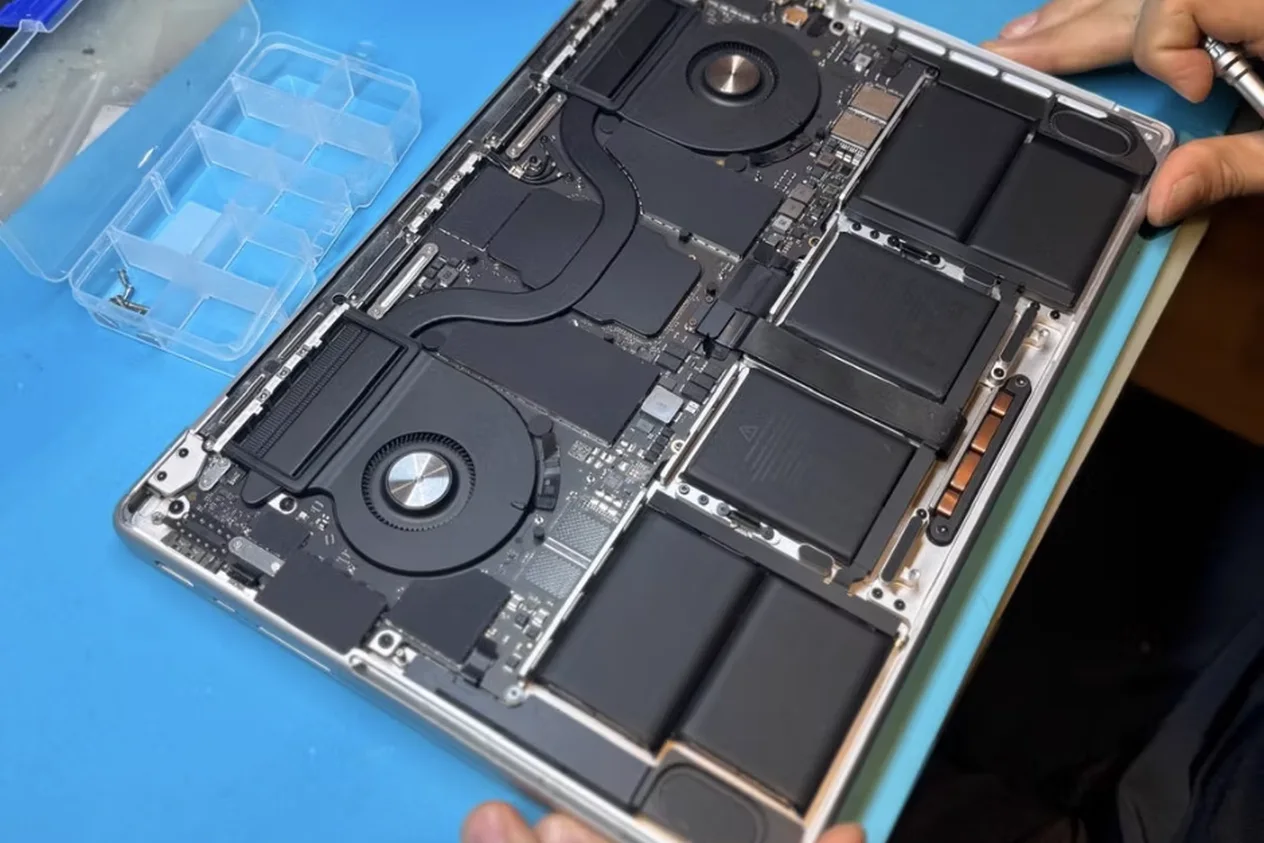
There is one more reason specific to the new models: the battery is glued to the case, in 4 or 6 cells (see the photo above), sandwiched between the trackpad and the logic board. A cell that starts to swell pushes on the trackpad first — which is why “the trackpad doesn’t click any more” is often the first symptom of a dying battery, not a trackpad fault.
How to check in 30 seconds
Battery Health
System Settings › Battery › Battery Health (ⓘ). “Normal” or “Service Recommended” + maximum capacity in percent. Under 80% = replace.
Cycle count
Apple menu › About This Mac › System Report › Power › “Cycle Count”. Over 800 it starts to matter; over 1,000 it is at the end regardless of the percentage.
Behaviour
Shuts down with 20–30% showing, battery life halved, warm while charging, trackpad stiff or the case no longer sits flat. The last two: stop charging, come in.
What we fit — and why we can afford a 12-month warranty
The MacBook battery market is full of 150-lei “compatibles” with recycled or undersized cells that report 100% on day one and 70% after three months. We do not sell or fit them. We use Apple Service Pack batteries where they exist and premium OEM batteries otherwise — same cell count, same mAh capacity as the original, from suppliers we have filtered over years, not by price.
The figure we track: fewer than 3% of the batteries we fit come back under warranty, over 12 months. That is the figure that lets us give 12 months instead of 3 and keep batteries in stock for all current models — we do not order them after you show up. Every battery is capacity-tested before fitting, and after fitting we show you the system report: 100%, 0 cycles.
On glued-in models the job is done with solvent, cell by cell, without forcing the case or the trackpad; the new adhesive is the dedicated one, not double-sided tape. That is why it is not an on-the-spot job: usually ready the same day, at most 24 hours from drop-off.
What it costs, per model
Final price, VAT included, battery + labour, updated automatically from stock. 12-month warranty on all.
| Model | Generation | Battery + fitting |
|---|---|---|
| MacBook Air 13" | M3 2024 | 780 lei |
| M2 2022 | 780 lei | |
| M1 2020 | 500 lei | |
| Intel 2018-2019 | 500 lei | |
| Intel 2013-2017 | 350 lei | |
| MacBook Pro 13" | M1 2020 | 500 lei |
| Intel 2020 | 500 lei | |
| Intel 2018-2019 | 500 lei | |
| Intel 2016-2017 | 500 lei | |
| Intel 2016-2017 | 500 lei | |
| Intel 2011-2015 | 500 lei | |
| Intel 2011-2015 | 470 lei | |
| MacBook Pro 14" | M2 2023 | 860 lei |
| M1 2021 | 860 lei | |
| MacBook Pro 15" | Intel 2018-2019 | 600 lei |
| Intel 2016-2017 | 500 lei | |
| Intel 2011-2015 | 290 lei | |
| Intel 2011-2015 | 470 lei | |
| MacBook Pro 16" | M2 2023 | 900 lei |
| M1 2021 | 900 lei | |
| Intel 2018-2019 | 600 lei |
Can’t find your model? See the MacBook battery replacement page or send us the A-number from the bottom of the laptop on WhatsApp.
Is it worth it, or should I buy a new one?
An M1 MacBook Air with a fresh battery is, in 2026, still a very good laptop for 90% of people — and stays supported by macOS for years. The gap between 290 lei and 5,000+ lei for a new model answers the question by itself, if the rest of the laptop is fine. If the display or logic board also has issues, we tell you straight at diagnosis; there is a separate guide: repair or buy a new MacBook.
Seen the price? Book your repair online
Choose your model and the issue, then pick a drop-off time — we confirm by email in minutes.
Book online