
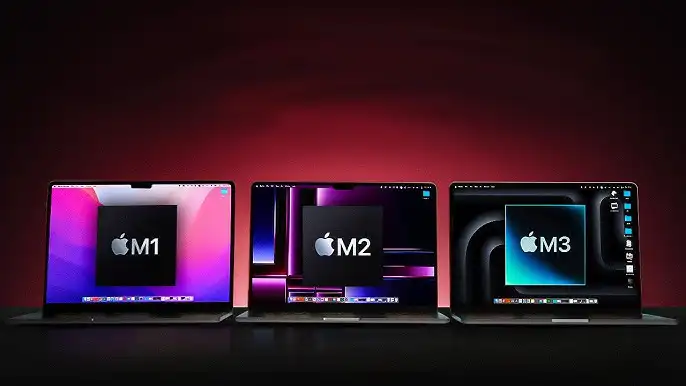
The short answer
- → You have M1 and do heavy tasks (4K video, code, 3D) — upgrade to M3/M4 is worth it
- → You have M1 and do browsing, docs, email — stay with it, you won't feel the difference
- → You have M2 — don't upgrade to M3, difference is under 20% in real use
- → Buying new today — get M4, has 16GB RAM base and is the recommendation of the year
CPU and GPU differences — real numbers
| Metric | M1 | M2 | M3 |
|---|---|---|---|
| CPU Cores | 8-core | 8-core | 8-core |
| GPU Cores | 7-8 | 10 | 8-10 |
| CPU vs M1 | 100% | +18-25% | +35-40% |
| GPU vs M1 | 100% | +35-40% | +55-65% |
| L2 Cache | 16MB | 16MB | 24MB dynamic |
| Ray Tracing | Software | Software | Hardware ✓ |
| Max RAM | 16GB | 24GB | 24GB |
M1 → M2: how it feels in practice
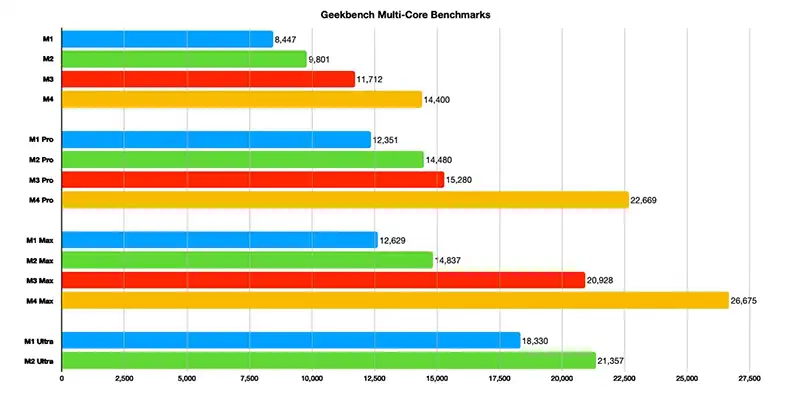
M2 is ~18-25% faster on CPU and ~35-40% on GPU. Sounds like a lot, but it depends on what you do:
M1→M2 verdict: If you do video editing, photo processing or code compilation — upgrade is worth it. If you browse and open documents, you won't feel any difference.
M2 → M3: marginal upgrade, with one exception
M3 is ~15-20% faster on CPU and ~20-25% on GPU vs M2 — smaller than the M1→M2 jump. But it has one important new feature: hardware ray tracing.
Hardware ray tracing (new on M3)
Software ray tracing (M1/M2) is slow. Hardware ray tracing (M3) is 5-10× faster. If you do 3D rendering or architecture, this is the upgrade that matters.
Dynamic L2 cache (24MB)
M3 dynamically allocates cache per task. In practice, apps launch faster and multitasking is smoother.
Thermal efficiency
M3 runs cooler at the same performance as M2. Fan kicks in less often.
Battery life
~1-2 hours more than M2 in normal use — real but not dramatic improvement.
M2→M3 verdict: If you do 3D rendering or gaming with hardware ray tracing — worth it. Otherwise, the 15-20% jump in real use is unnoticeable and doesn't justify the cost.
Battery and temperature in real use
M1
15-16 hours
Fan kicks in rarely, only on heavy loads
M2
16-17 hours
Fan kicks in more often — M2 generates more heat
M3
16-18 hours
Fan kicks in rarely, more thermally efficient than M2
All three offer 15-18 hours in normal use. If you have an M1 with a worn battery after 3+ years, replacement costs 300-600 RON — much cheaper than an upgrade.
Who should upgrade, who shouldn't
M1 → upgrade to M2/M3/M4 if:
- ✓ You edit 4K+ video regularly
- ✓ You compile large code projects (30+ seconds on M1)
- ✓ You do 3D rendering — hardware ray tracing on M3/M4 is transformative
- ✓ You have 8GB RAM and feel slowness in multitasking
- ✓ The MacBook is 3+ years old and battery is below 80%
M1 → stay with it if:
- → Light use: web, documents, email, video calls
- → MacBook is under 3 years old and battery is over 80%
- → Budget doesn't allow upgrade — M1 will run excellently for another 3-4 years
M2 → upgrade to M3 only if:
- ✓ You do 3D rendering with ray tracing (significant difference)
- ✓ MacBook is 3+ years old and battery is worn
- ✓ You sell the M2 and recoup 50-60% of the M3 price
What to buy in 2025
1,500-2,200 RON
Excellent second-hand. Check the battery — after 3+ years it may be worn. Best price/quality ratio for light use.
2,500-3,500 RON
Second-hand sweet spot. Better GPU, fresher battery if from 2022-2023.
4,200+ RON
Best new choice until recently. Hardware ray tracing and dynamic cache. Worth the price for advanced users.
4,200+ RON
2025 recommendation. 16GB RAM in the base config, clearly superior performance, same starting price as M3.
Conclusion
Apple Silicon is stable and durable. M1 from 2021 works excellently in 2025 for the vast majority of users. If you have M1 and it works well, you can stay with it another 3 years. If you have M2, M3 isn't urgent — wait for M4 or M5. The upgrade is worth it when you need a specific feature (ray tracing, more RAM) or when the battery dies after 3-4 years of use.