Unstable Wi-Fi and frequent disconnects
Symptom
Frequent disconnects, random IP changes, download speeds cut in half. Appears mostly on MacBook Air M3 and iMac 24-inch.
Cause
Bug in the Wi-Fi 6E driver that doesn't correctly handle legacy routers. Conflict between the 6GHz band and older 5GHz networks.
How to fix
- 1 Click the Wi-Fi icon → "Wi-Fi Settings" → find the problematic network → gear icon → "Forget This Network"
- 2 Reconnect with the password. If the issue returns: open Terminal and run the commands below
- 3 System Settings → Network → VPN & Filters → temporarily disable DNS filtering
- 4 Restart the Mac
Terminal
sudo dscacheutil -flushcache
sudo killall -HUP mDNSResponder
Status: Fix confirmed in macOS 26.1+. Install update from System Settings → General → Software Update.
Windows can't be resized (Liquid Glass corners)
Symptom
The new Liquid Glass windows have such rounded corners that the resize area has become almost impossible to grab — just 3px vs 8px in Sonoma.
Cause
Corner radius increased from 12px to 28px in the new design. The clickable resize area shrank drastically.
How to fix
- 1 Resize from the side or top edges (not the corner)
- 2 Or: System Settings → Desktop & Dock → enable "Stage Manager" — windows become normally resizable
- 3 Alternatively: install Rectangle (free, open-source) — it offers resize hotkeys (Option + Cmd + R)
Status: Apple confirmed it as a known issue. Fix expected in macOS 26.4.
Mac restarts itself (Kernel Panic)
Symptom
Spontaneous restart with no warning, grey screen followed by automatic restart. Logs show kernel panic in the Time Machine module.
Cause
Bug in the Time Machine integration with the new filesystem layer in Tahoe 26.3.
How to fix
- 1 System Settings → General → Time Machine → Toggle OFF
- 2 Wait 15 minutes — check if crashes stop
- 3 If you have an external volume mounted: Terminal → diskutil list → diskutil unmount /Volumes/[DriveName]
- 4 If the problem persists: full backup + clean reinstall (Recovery Mode: Cmd+R at startup)
Terminal
diskutil list
diskutil unmount /Volumes/BackupDrive
Status: Urgent update to 26.3.1+ when available. Disable auto-backup until then.
Battery drains rapidly (40-60% more than Sonoma)
Symptom
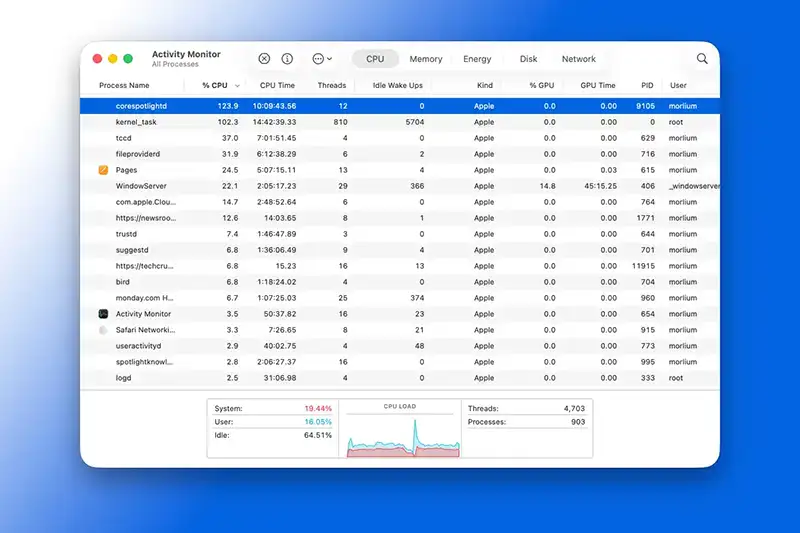
Battery life from 15 hours to 8–9 hours. Activity Monitor shows kernel_task at 50%+ CPU. Mac warms up even at rest.
Cause
Spotlight reindexing in the first 24–48h, aggressive iCloud sync, Apple Intelligence running in background.
How to fix
- 1 System Settings → Siri & Spotlight → deselect indexing for unnecessary folders
- 2 System Settings → [Account] → iCloud → temporarily disable Photos, Files, Mail (24–48h)
- 3 System Settings → General → Login Items → remove unnecessary apps
- 4 System Settings → Apple Intelligence → disable if you don't actively use it
- 5 Open Activity Monitor → Energy tab → sort by "CPU Time" → identify the culprit processes
Terminal
top -o %CPU -o %MEM
Status: Normal in the first 24–48h post-update. If it persists after 48h with Spotlight and iCloud disabled, it's a real bug — update to the latest version.
Apple Mail and Calendar freeze or won't sync
Symptom
Mail and Calendar close abruptly. Sync with iCloud Calendar fails or events stop appearing.
Cause
Bug in the SQLite database layer in macOS Tahoe — corruption in the local cache.
How to fix
- 1 System Settings → Mail → Accounts → delete the affected account → add it back
- 2 Or reset the Mail cache from Terminal with the commands below
- 3 Restart the Mac after the reset
Terminal
rm ~/Library/Mail\ Downloads/*
rm ~/Library/Mail\ Index/V*/*
killall Mail
Status: If the problem returns: disable iCloud Mail sync for 24h, then re-enable.
Spotlight can't find files
Symptom
Cmd+Space no longer finds documents even though they exist on the Mac. Results are incomplete or missing.
Cause
Incomplete or corrupted Spotlight index after the update.
How to fix
- 1 System Settings → Siri & Spotlight → Privacy → add the main drive to exclusions → wait 10 sec → remove it
- 2 Spotlight will fully reindex (30–60 minutes depending on disk size)
- 3 Or force full reindexing from Terminal with the commands below
Terminal
sudo mdutil -i off /
sudo mdutil -i on /
Status: Reindexing resolves the issue permanently. No system update needed.
Bluetooth — AirPods, mouse, keyboard disconnects
Symptom
Bluetooth devices disconnect randomly and don't reconnect automatically. AirPods disconnect when switching activity.
Cause
Bug in the Bluetooth daemon in Tahoe that doesn't handle automatic reconnect properly.
How to fix
- 1 System Settings → Bluetooth → click gear next to device → "Remove" → confirm
- 2 Restart Mac
- 3 Re-pair the device (put it in pairing mode)
- 4 If the issue returns: reset the Bluetooth module from Terminal with the commands below
Terminal
sudo launchctl stop com.apple.bluetoothd
sleep 2
sudo launchctl start com.apple.bluetoothd
Status: Partially fixed in 26.2. If it persists after update, try SMC reset (hold Power 10 sec).
GPU thermal throttling on Apple Silicon
Symptom
M3 and M4 Macs overheat and performance drops sharply under load. Reported temperatures of 95–100°C.
Cause
The thermal driver in Tahoe doesn't correctly calibrate power limits for Apple Silicon chips.
How to fix
- 1 Download iStat Menus (free trial) for real-time temperature monitoring
- 2 Normal: 50–75°C · Alert: 90°C+ · Throttling: 100°C
- 3 System Settings → General → About → disable "Low Power Mode" (paradoxically, can worsen throttling)
- 4 Disconnect external monitors temporarily if possible
- 5 Clean ventilation slots with compressed air
Status: Fix in progress at Apple. Monitor temperature and avoid prolonged intensive workloads.
Kernel panic when launching certain apps (Adobe, Office, Final Cut)
Symptom
Apps such as Adobe Photoshop, Microsoft Office or Final Cut Pro trigger kernel panic on launch.
Cause
Incompatibility with new security features in Tahoe (changes in System Integrity Protection).
How to fix
- 1 Check on the developer's website that the app is compatible with macOS 26
- 2 Reinstall the app (fresh download, not from backup)
- 3 If that doesn't help: boot in Recovery Mode (Cmd+R) → Utilities → Terminal → csrutil disable → restart
- 4 Test the app — then MANDATORY: re-enable SIP: csrutil enable
Terminal
# IN RECOVERY MODE:
csrutil disable
# after testing, re-enable:
csrutil enable
Status: ⚠ Disabling SIP is a security risk. Enable immediately after testing. Wait for a compatibility update from the developer.