| Questionmark folder/SSD not recognized | 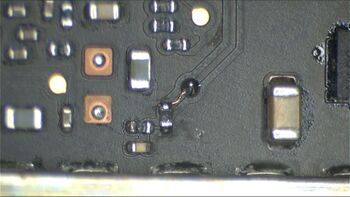
Fig. 1 - R9350 PICCOLO_IUVD no longer soldered to board and missing pad for pin 1 (PPVIN_2V7NAND_LB). See Fig 1. Inspect the area near R9350, including the trace coming out of Terminal 1 of R9350, oftentimes the neighboring via breaks up the trace, Measure the resistor, it is often out of spec.
- Example of broken trace: https://www.youtube.com/watch?v=m6lTkZnykqo (fixed by running wire to replace the broken trace)
- Same issue but bad probe point that can look good at a cursory investigation https://www.youtube.com/watch?v=WbuRSUitwCw
- Troubleshoot Piccolo circuit, it's very sensitive to any sort of water damage in it's vicinity.
- Probe inductors near the Piccolo chip. If it is shorted, replace the Piccolo chip (inject 1.3 V on these inductors usually won't give you a strong hotspot).
- When not liquid damaged, often a dead SSD (you're screwed)
- In one case, a short circuit caused by C9416/Q9401/U9400 due to U9400 circuit failure.
- I had one case where no damage in the R9350 area but upon checking, there was no PPVIN_2V7NAND_LB at the TP above R9350. I had previously checked the integrity of the Lifeboat connector at J9600 and all was good there. However there was no continuity between that TP and pin 43 (PPVIN_2V7NAND_LB) of J9600. Looking at the schematic that PPVIN_2V7NAND_LB line comes from PPBUS_GSH so as a test I ran a jumper from the closest source of PPBUS_GSH (pin 1 C6582) to the testpad and the SSD was now detected. After inspection and not finding any breaks in that PPVIN_2V7NAND_LB line, I deliberated on where to best access PPVIN_2V7NAND_LB from. I ran a jumper wire from pin 1 C9400 (PPVIN_2V7NAND_LB) and conformal coated that enameled jumper wire and considered it a viable repair.
- I had one with a damaged trackpad cable that had shorted PP3V3_S4_TPAD. This goes to R5650 and then to R8901 as PP3V3_S4 and leaves as STORAGE_EN to go to J9600 lifeboat connector. It leaves that as STORAGE_LB_EN and goes to U9300 as its EN line. U9300 is the PMIC for SSD. Replaced trackpad cable and system is now reliably booting again.
- I had one showing flashing folder so I checked the PPVIN_2V7NAND_LB line but it was good. Customer said it had a liquid spill on keyboard so I disconnected the keyboard and it booted into an OS. Supplied customer with a good second hand top case and issue is resolved. I could not be certain what shorted in keyboard to cause this but it is definitely resolved now leading to a happy little Macbook.
|
| 20 V, 0 A, not turning on, no shorts | Check for low resistance to ground on SMBUS_SMC_5_G3H_SDA or SMBUS_SMC_5_G3H_SCL. On older MacBooks, this would result in no battery recognition and a lower voltage on PPBUS_G3H. On USB-C models, it actually results in the machine not turning on at all. Can be caused by a tiny speck of conductive material in the battery connector. Can also be caused by C7605 shorted on PP5V_S4. |
| Random crashing | No answer. |
| No power, PPBUS_G3H shorted to ground. | Inject 1 V (increase if no reaction), watch for hot spots with thermal camera. Usually it's a bad tantalum capacitor. Measure PPBUS_G3H to vCORE coils (coils around CPU/GPU). If those measure under 1 Ω (0.3–0.8Ω) then you most likely have a direct 12 V short to CPU/GPU. On this board this situation is always a no-fix. Example: No Power — A1706 2016 4xTBT3 TB 13" MacBook Pro 820-00239 - 0 V — PPBUS_G3HOT
- Inject 1 V into PPBUS_G3HOT rail.
- U7600 Dual MOSFET gets hot. Part number CSD58879Q3D.
- Visual inspection of shorted component shows solder ball popping out the side of component. C7601 is also damaged.
- Removed C7601, short still persists.
- Removed U7600, short gone.
- As of April 29, 2018 no donors available. Board not fixed.
- https://www.youtube.com/watch?v=608unuqLWj8
|
| Charger at 5 V, 0.000 A draw (no power draw) | PP3V3_G3H is most likely shorted to ground with a 0–1 Ω short, most likely due to bad capacitor. When PP3V3_G3H is directly shorted to ground, it won't produce heat. The PP3V3_G3H power IC is smart enough, usually, when it detects a straight 0 Ω short, to just turn off. |
| Charger stuck at 5 V instead of 20 V | - If 5 V and 0.00 A draw, most likely a 0–1 Ω short to ground on PP3V3_G3H. It can also be caused by a bad CD3215 which is missing its 1v1 LDO. The LDO will only appear when the charger is plugged into the corresponding port so to find out which one is bad, plug in the charger one port at a time and measure 1v1 LDO_BMC of corresponding chip.
- PP3V3_G3H missing due to a short circuit on the input to PP3V3_G3H creation circuit.
- PP3V3_G3H missing due to a short circuit on the rail itself (refer to symptoms for repairing short to ground on PP3V3_G3H below).
- Corroded LDO capacitor for PP3V3_G3H around a CD3215. On right side of board, check under shielding by SSD under the right CD3215 for hidden corroded capacitor. Example: https://www.youtube.com/watch?v=Wb5dkH_mTEc (PP3V3_G3H 1.5 V, also bad ISL9239)
- PP3V3_G3H missing due to PM_EN_P3V3_G3H missing due to bad ISL9239 (U7000) Example: https://www.youtube.com/watch?v=Wb5dkH_mTEc (PP3V3_G3H 1.5 V, also corrosion at LDO capacitors next to CD3215)
- Bad U6903, responsible for creating PP3V3_G3H
- Diode providing input to U6903 is bad
- Bad C6905, C6906 capacitors around U6903
- Bad CD3215
- Bad CD3215 ROM chip (U2890)
- 300 mA for a few seconds then reboot (PP3V3_G3H present and working CD3215): corroded resistors around thunderbolt ROM chip (U2890 or UB090)
If the issue is a bad CD3215, one way to get an idea, is to see which does not boot loop. When you plug the charger in with the USB-C current meter, it will turn on for 2–3 seconds, then turn off and turn on again. Whichever port doesn't boot loop usually has an associated CD3215 that is bad. Also, the bad CD3215 will occasionally get hotter than the rest. Example: https://www.youtube.com/watch?v=pVg6Oxn9IUM See Charger stuck at 5 V instead of 20 V |
| PP3V3_G3H short circuited to ground | - A CD3215 is short circuited to ground, will show up instantly on thermal camera which one it is.
- CB300 corroded, but you can't see it because it is hiding under the metal around the NAND. LOOK CLOSELY!
- Some other random component, but check CB300 first.
|
| Charger not turning on USB-C current meter at all. | Check PP20V_USBC for each port's resistance to ground. USB-C charge port is shorted to ground, inside the charge port. Replace the charge port, it is modular. See if it changes. |
| Battery not recognized | First, try a known good battery. If it doesn't work, check the battery cable going to the board. Sometimes there is corrosion here, sometimes the customer tore the bar on the connector off the connector. In some rare cases the SMC still is a factor in battery recognition on this board. |
| No backlight | Make sure the issue is no backlight, and not no image! - Verify that the screen assembly does not have the "flexgate" issue. Open laptop just a tiny bit and see if image/backlight shows. You can tell it is a flexgate issue when you can see a backlight when the machine is barely open, but you cannot see a backlight once the screen is fully open. This is caused by the screen cable being too short and is a design fault that Apple released a service program for, but only for 13" 2016 models. The exact same cable and therefore the exact same problem also occurs on 15" models but there is no service program for it. To fix the flexgate issue, replace the screen cable with the longer version that is sold as a spare part. You can watch a video of how to fix the flexgate issue here.... https://www.youtube.com/watch?v=neigIMBUQf0
- Blown backlight fuse rarely if ever happens. This board has a current sensing circuit in place that keeps the backlight fuse from blowing if there is a short to ground on the backlight line.
- Short to ground on backlight output due to bad capacitor on output.
- Bad screen — if backlight voltage is 49–55 V, bad screen. This can also be caused by the flexgate issue. Watch the video linked above for more info on how to fix the flexgate issue.
- Corrosion on current sense vias/traces for backlight to U8400 LP8548
|
| No image | Check the LCD cable and the connector on both the screen side and the logic board side. The backlight power line is right next to the eDP data line for the image. Any minor corrosion here results in 30 V or more going to the CPU data line. This we have no solution for since replacing the CPU isn't economically viable. It can be a bad GPU inside the CPU, which we have no solution for. |
| "Braindead" | Laptop turns on but draws 100–200 mA, no image. Rest in peace. No Solution. |
| High fan spin/missing left/right sensors | U5860/U5850 often get damaged in opening/prying Q6000/Q6050 often get damaged when handling board, they have a higher profile than most components. These components missing can cause a mix of single high fan spin, both fans spinning fast, the computer being slow, or functioning normally with missing sensors. Good Luck. Freezing, high fan spin - check for corrosion in the above area and replace if necessary R5860;C5861 & U5860. |
| Not charging and stuck at 5 V with 20–30 mA PP3V3_G3H present and working CD3215 | Thunderbolt ROM on one of the sides is bad, need to be replaced. watch this video from 15:14 to get more info on this specific diagnosis https://www.youtube.com/watch?v=vXAK2l1oMZM |
| Not charging battery (machine turns on), charger taking 20 V, 700 mA | Check to see if the battery is recognized, check if PPBUS_G3H is present, check Q7065 (MOSFET between battery and PPBUS_G3H), check with good battery Example: https://www.youtube.com/watch?v=AgLgY6X0mKs (caused by bad battery, PPBUS_G3H present, Q7065 checked) |
| Two USB-C ports drawing 5 V 0.15 A, other two 5 V 0.25 A | The two CD3215 on the 5 V 0.15 A side were hot. Replaced these, ISL9239, MOSFETS associated with CD3215, PPDCIN_G3H, and PP3V3_G3H restored, and works. |
| Liquid damaged ISL 9239 chip causing the laptop to fail to turn on with NO PPBUS_G3H. | Replace the ISL 9239 chip. Example: https://www.youtube.com/watch?v=eGr_DRojGNg (USB-C Macbook Pro not turning on no PPBUS_G3H). |
| Critical Software Update failed to install. | - Bad Touchbar. Unplug Touchbar and try to update again.
- Bad camera caused by Flexgate, unplug LCD and try to update again on external display.
- Bad touchID, the T1 chip controls the touchID so in theory a bad touchID could cause this error although unconfirmed.
- Format drive and install MacOS. If data is required, boot into safe mode by holding shift and transfer data off.
- If you have tried all of that, then it is most likely a board related issue caused by either bad PMIC or bad T1 chip. Measure all U4200 buck outputs.
- PP1V8_Sleep3_Buck3 pulled down by corrosion under U4200/T1 PMIC. Fixed by reballing PMIC. This was also causing the Macbook to take a long time to post.
- Additional Troubleshooting steps - https://logi.wiki/index.php/Critical_Update_Required_Troubleshooting
|